Database Management Systems - It is a software package to store, retrieve, query, and manage data in a table.
Database is a collection of tables. Every table consists of rows (records) and columns (attributes). Each rows provides details of a specific instance of the same object type for that table.
Example of a database: Consider Facebook
- each user would have their own row/record in the database table
- the columns of the table would be: fname, lname, profile pic, friends, advertisements, liked posts, and etc.
* Database vs Data structure
- Database is a collection of data (records) stored & managed in permanent memory (hard disk)
while
- Data Structure is a way of storing and arranging data arranging data efficiently in temporary memory (RAM)
Databases --(contain)--> database objects --(these obj. can be implemented using)--> Data Structures
RDBMS (Relational Database Management System)
is a program used to create, update, and manage relational databases (ex: MySQL), while SQL is a programming language that is used to communicate with databases.
Database is a collection of tables. Every table consists of rows (records) and columns (attributes). Each rows provides details of a specific instance of the same object type for that table.
Example of a database: Consider Facebook
- each user would have their own row/record in the database table
- the columns of the table would be: fname, lname, profile pic, friends, advertisements, liked posts, and etc.
* Database vs Data structure
- Database is a collection of data (records) stored & managed in permanent memory (hard disk)
while
- Data Structure is a way of storing and arranging data arranging data efficiently in temporary memory (RAM)
Databases --(contain)--> database objects --(these obj. can be implemented using)--> Data Structures
RDBMS (Relational Database Management System)
is a program used to create, update, and manage relational databases (ex: MySQL), while SQL is a programming language that is used to communicate with databases.
SQL vs NoSQL
- SQL is a programming language used for querying relational databases
ex: MySQL, Oracle, MS-SQL server, Postgres
while
- NoSQL are non-relational databases
ex: Mongo DB, Redis, Neo4j, Cassandra
5 critical differences between SQL vs NoSQL are:
- SQL is a programming language used for querying relational databases
ex: MySQL, Oracle, MS-SQL server, Postgres
while
- NoSQL are non-relational databases
ex: Mongo DB, Redis, Neo4j, Cassandra
5 critical differences between SQL vs NoSQL are:
- Relational databases => SQL, Non-relational databases => NoSQL
- SQL = predefined schema. NoSQL databases = dynamic schemas for unstructured data
- SQL databases are vertically scalable, while NoSQL databases are horizontally scalable
- SQL databases are table-based, while NoSQL databases are document, key-value pair, graph, or wide-column stores
- SQL databases are better for multi-row transactions, while NoSQL is better for unstructured data like documents or JSON
Mostly used / Popular databases
|
SQL
|
NoSQL
|
Using SQL in a website
To build a web site that shows data from a database, you will need:
To build a web site that shows data from a database, you will need:
- An RDBMS database program (i.e. MS Access, SQL Server, MySQL)
- To use a server-side scripting language, like PHP or ASP
- To use SQL to get the data you want
- To use HTML / CSS to style the page
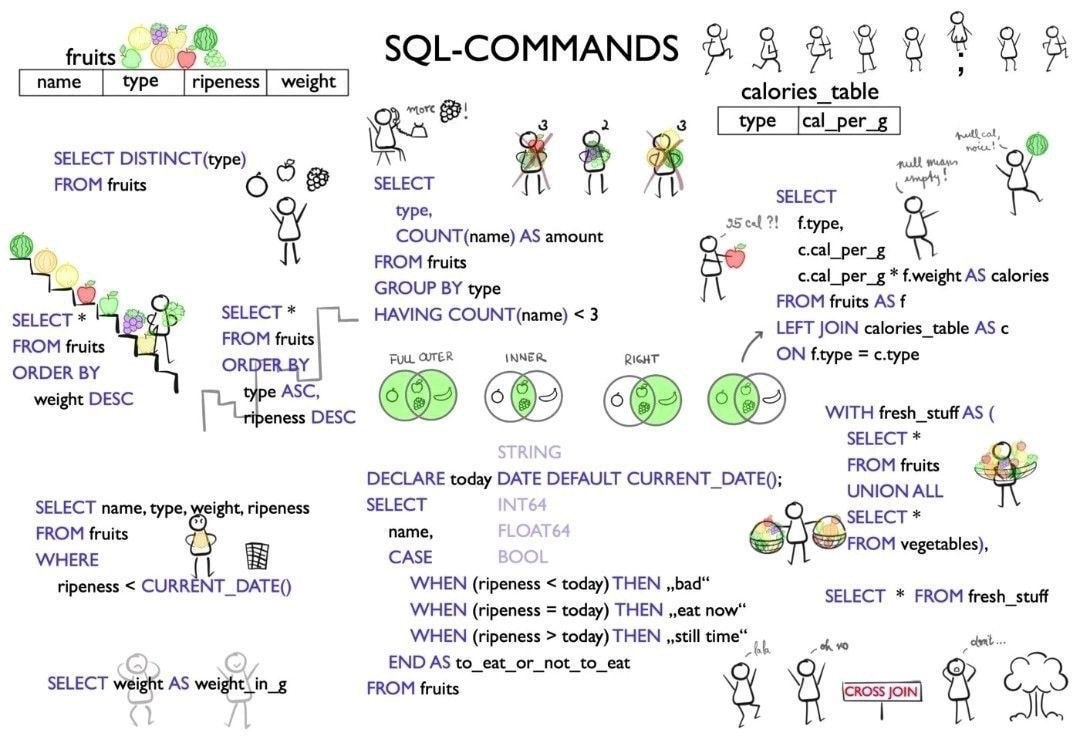
SQL keywords are not case sensitive. Some database systems require a semicolon at the end of each SQL statement while other don't.
SELECT
- SELECT column1, column2, ... FROM table_name;
- The data returned is stored in a result table, called the result-set
- ex: SELECT * FROM table_name; -- selects all columns from the table
- ex: SELECT CustomerName, City FROM Customers;
- -
- SELECT DISTINCT column1, column2, ... FROM table_name;
- Selects only the distinct values from each column listed
- ex: SELECT DISTINCT Country FROM Customers;
- ex: SELECT CustomerID, Country FROM Customers;
- -- selects all rows with distinct customerID and then all rows with distinct country,
- -- if customerID are unique all rows will be returned even with duplicate countries
WHERE
- SELECT column1, column2, ... FROM table_name WHERE condition;
- -- not only used in select statements but also in update, delete, etc.
- ex: SELECT * FROM Customers WHERE Country='Mexico';
- SQL requires single quotes around text values and no quotes around numeric fields
- Operators that can be used in `WHERE` clause: =, <, >, >=, <=, !=/<> (not equal), BETWEEN, LIKE, IN
- -
- The WHERE clause can be combined with AND, OR, and NOT operators
- ex: SELECT * FROM Customers WHERE Country='Germany' AND City='Berlin';
- ex: SELECT * FROM Customers WHERE City='Berlin' OR City='München';
- ex: SELECT * FROM Customers WHERE NOT Country='Germany';
ORDER BY
- Sorts the resulting table in ascending/descending order by the stated column
- SELECT column1, column2, ... FROM table_name ORDER BY column1, column2, ... ASC|DESC;
- ex: SELECT * FROM Customers ORDER BY Country DESC;
- ex: SELECT * FROM Customers ORDER BY Country, CustomerName;
- -- orders by Country, but if some rows have the same Country, it orders them by CustomerName
GROUP BY
- Groups rows that have the same values into summary rows, like "find the number of customers in each country"
- Often used with aggregate functions (COUNT(), MAX(), MIN(), SUM(), AVG()) to group the result-table by one or more columns
- SELECT column_name(s) FROM table_name WHERE condition GROUP BY column_name(s) ORDER BY column_name(s);
- ex: SELECT COUNT(CustomerID), Country FROM Customers GROUP BY Country;
- ex: SELECT COUNT(CustomerID), Country FROM Customers GROUP BY Country ORDER BY COUNT(CustomerID) DESC;
HAVING
- The HAVING clause was added to SQL because the WHERE keyword cannot be used with aggregate functions
- SELECT col_name(s) FROM table_name WHERE condition GROUP BY col_name(s) HAVING condition ORDER BY col_name(s);
-
- ex: SELECT COUNT(CustomerID), Country FROM Customers GROUP BY Country HAVING COUNT(CustomerID) > 5;
- -- lists the number of customers in each country and only include countries with more than 5 customers
- ex: SELECT COUNT(CustomerID), Country FROM Customers WHERE Country='Mexico' HAVING COUNT(CustomerID) > 5;
- -- lists the number of customers from Mexico only if it has more than 5 customers
INSERT INTO
- Allows to insert a new record into a table
- INSERT INTO table_name (column1, column3, column2, ...) VALUES (value1, value3, value2, ...);
- INSERT INTO table_name VALUES (value1, value2, value3, ...);
- ex: INSERT INTO Customers (CustomerName, City, Country) VALUES ('Cardinal', 'Stavanger', 'Norway');
- -- if a column is not mentioned, it will be automatically filled null values/*auto-increment
-
- NULL values can't be caught using comparison operators ie: =, <, or <>
- IS NULL and IS NOT NULL should be used
- SELECT column_names FROM table_name WHERE column_name IS NULL;
- SELECT column_names FROM table_name WHERE column_name IS NOT NULL;
UPDATE
- Used to modify existing records in a table
- UPDATE table_name SET column1 = value1, column2 = value2, ... WHERE condition;
- Be careful when updating records. If you omit the WHERE clause, ALL records will be updated!
- ex: UPDATE Customers SET ContactName = 'Alfred Schmidt', City= 'Frankfurt' WHERE CustomerID = 1; -- Updating 1 record
- ex: UPDATE Customers SET ContactName='Juan' WHERE Country='Mexico'; -- Updating multiple records
-
- DELETE FROM table_name WHERE condition;
- ex: DELETE FROM Customers WHERE CustomerName='Alfreds Futterkiste';
- ex: DELETE FROM table_name; -- * Deletes all records from table w/o deleting the table!
SELECT TOP / LIMIT - (MySQL) / FETCH FIRST - (Oracle)
- Used to specify # of records to return
- -
- SELECT TOP number|percent column_name(s) FROM table_name WHERE condition;
- ex: SELECT TOP 3 * FROM Customers;
- ex: SELECT TOP 50 PERCENT * FROM Customers;
- -
- SELECT column_name(s) FROM table_name WHERE condition LIMIT number;
- ex: SELECT * FROM Customers WHERE Country='Germany' LIMIT 3;
- -
- SELECT column_name(s) FROM table_name ORDER BY column_name(s) FETCH FIRST number ROWS ONLY;
- ex: SELECT * FROM Customers WHERE Country='Germany' FETCH FIRST 3 ROWS ONLY;
- ex: SELECT * FROM Customers FETCH FIRST 50 PERCENT ROWS ONLY;
MIN / MAX
COUNT
- Returns the smallest / largest value of the column
- SELECT MIN/MAX(column_name) FROM table_name WHERE condition;
-
- ex: SELECT MIN/MAX(Price) AS SmallestPrice FROM Products;
- -- Below shows result for MIN
- Number of Records: 1
SmallestPrice
2.5 - -
COUNT
- Returns the total # of rows of the resulting table
- SELECT COUNT(column_name) FROM table_name WHERE condition;
- ex: SELECT COUNT(ProductID) FROM Products;
- -
- Returns the average of the numeric column
- SELECT AVG(column_name) FROM table_name WHERE condition;
- ex: SELECT AVG(Price) FROM Products;
- -
- Returns total sum of a numeric column
- SELECT SUM(column_name) FROM table_name WHERE condition;
- ex: SELECT SUM(Quantity) FROM OrderDetails;
LIKE
- Used in a WHERE clause to search for a specific pattern in a column
- 2 Wildcards used w/ LIKE operator:
- % (percent sign): represents 0, 1, or multiple chars - MS uses * (asterisk sign) instead
- _ (underscore sign): represents only 1 char - MS uses ? (question mark) instead
- SELECT column1, column2, ... FROM table_name WHERE columnN LIKE pattern;
- ex: SELECT * FROM Customers WHERE CustomerName LIKE 'a__%';
- ex: SELECT * FROM Customers WHERE CustomerName NOT LIKE 'a%';
-
- Used in general SQL server
- [] : represents only 1 char that is mentioned in the brackets (ie: h[oa]t matches hat and hot but not hit or hoot)
- ^ : represents only 1 char that is NOT mentioned in the brackets (ie: h[oa]t matches hit but not hot or hat)
- - MS uses ! (exclamation mark) instead
- - : represents only 1 char within the specified range (ie: c[a-c]t matches cat, cbt, cct but not cdt)
- # : represent any single numeric char (ie: 2#9 matches 209, 219, 229, 239, etc.) - only works in MS
IN
- Allows to specify multiple values in a WHERE clause ~ almost like a shorthand for multiple ORs
- SELECT column_name(s) FROM table_name WHERE column_name IN (value1, value2, ...);
- SELECT column_name(s) FROM table_name WHERE column_name IN (SELECT STATEMENT);
-
- ex: SELECT * FROM Customers WHERE Country (NOT) IN ('Germany', 'France', 'UK'); -- can include NOT to get opposite result
- ex: SELECT * FROM Customers WHERE Country IN (SELECT Country FROM Suppliers);
BETWEEN
- Selects values (ie: numbers, texts, dates) within a given range & inclusive
- SELECT column_name(s) FROM table_name WHERE column_name BETWEEN value1 AND value2;
-
- ex: SELECT * FROM Products WHERE Price (NOT) BETWEEN 10 AND 20;
- ex: SELECT * FROM Products WHERE ProductName BETWEEN 'Carnarvon Tigers' AND 'Mozzarella di Giovanni'
- -- will return all records w/ ProductName alphabetically between the 2 listed
- ex: SELECT * FROM Orders WHERE OrderDate BETWEEN '1996-07-01' AND '1996-07-31';
ALIASES
- Used to set a temp name for a column or a table for readability
- SELECT column_name AS alias_name FROM table_name; -- for columns
- SELECT column_name(s) FROM table_name AS alias_name; -- for tables
-
- ex: SELECT CustomerID AS ID, CustomerName AS Customer FROM Customers; -- resulting table will have 2 columns: ID, Customer
- ex: SELECT CustomerName AS Customer, ContactName AS [Contact Person] FROM Customers;
- -- use double quotes or square brackets for new column names
- ex: SELECT CustomerName, Address + ', ' + PostalCode + ' ' + City + ', ' + Country AS Address FROM Customers;
- -- combines values from different columns as 1 column in resulting table
- in MySQL = SELECT CustomerName, CONCAT(Address,', ',PostalCode,', ',City,', ',Country) AS Address FROM Customers;
- in Oracle = SELECT CustomerName, (Address || ', ' || PostalCode || ' ' || City || ', ' || Country) AS Address FROM Customers;
- ex: SELECT o.OrderID, o.OrderDate, c.CustomerName FROM Customers AS c, Orders AS o WHERE c.CustomerName='Around the Horn' AND c.CustomerID=o.CustomerID;
- = SELECT Orders.OrderID, Orders.OrderDate, Customers.CustomerName FROM Customers, Orders WHERE Customers.CustomerName='Around the Horn' AND Customers.CustomerID=Orders.CustomerID;
JOIN
INNER JOIN
- Used to combine rows from 2 or more tables based on a related column between them
INNER JOIN
- Only selects the records that have matching values in both tables
- SELECT column_name(s) FROM table1 INNER JOIN table2 ON table1.column_name = table2.column_name;
- ex: SELECT Orders.OrderID, Customers.CustomerName, Orders.OrderDate FROM Orders INNER JOIN Customers ON Orders.CustomerID=Customers.CustomerID; -- Both tables, Orders and Customers have CustomerID column
- -- If there are records in the "Orders" table that do not have matches in "Customers", these orders will not be shown!
-
- ex: SELECT Orders.OrderID, Customers.CustomerName, Shippers.ShipperName FROM (
- (Orders INNER JOIN Customers ON Orders.CustomerID = Customers.CustomerID) -- hidden SELECT * FROM
- INNER JOIN Shippers ON Orders.ShipperID = Shippers.ShipperID); -- 3 join
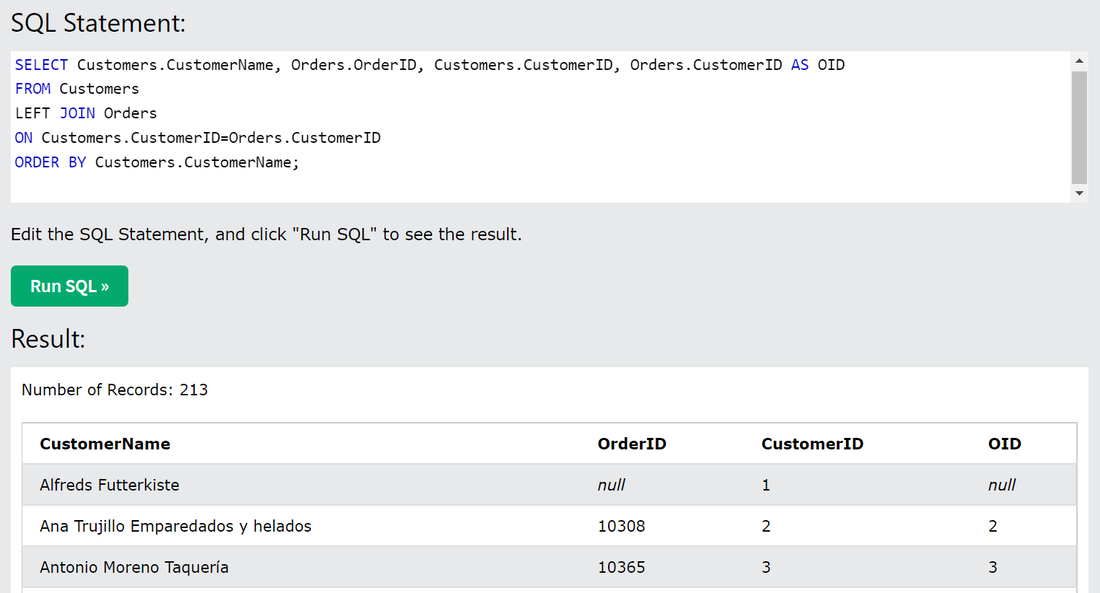
LEFT JOIN (~ LEFT OUTER JOIN)
- Returns all records from the left table (table1), and the matching records from the right table (table2)
- SELECT column_name(s) FROM table1 LEFT JOIN table2 ON table1.column_name = table2.column_name;
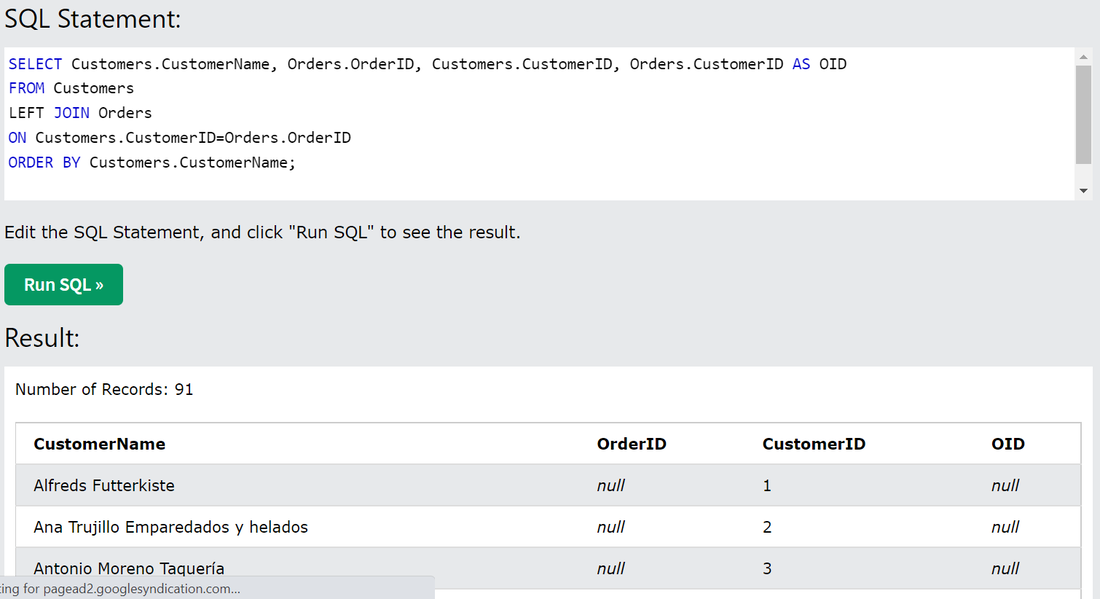
- If the condition after ON is not satisfied even once => returns only left table with column from table2 set as null
- ex: SELECT Customers.CustomerName, Orders.OrderID FROM Customers
- LEFT JOIN Orders ON Customers.CustomerID = Orders.CustomerID;
|
|
RIGHT JOIN
- Just like LEFT JOIN, it returns all records from the right table (table2), even if there are no matches in the left table
- SELECT column_name(s) FROM table1 RIGHT JOIN table2 ON table1.column_name = table2.column_name;
- ex: SELECT Orders.OrderID, Employees.LastName, Employees.FirstName FROM Orders
- RIGHT JOIN Employees ON Orders.EmployeeID = Employees.EmployeeID;
- -- returns all employees and any orders they may have
- -
- These are both left and right inclusive join, left and right exclusive join can be found just by adding a `where opp table is null`
FULL JOIN = FULL OUTER JOIN
- returns all records when there is a match in left (table1) or right (table2) table records
- SELECT column_name(s) FROM table1 FULL OUTER JOIN table2 ON table1.column_name = table2.column_name WHERE condition;
- The FULL OUTER JOIN keyword returns all matching records from both tables whether the other table matches or not
- ex: SELECT Customers.CustomerName, Orders.OrderID FROM Customers
- FULL OUTER JOIN Orders ON Customers.CustomerID=Orders.CustomerID
ORDER BY Customers.CustomerName; - -- resulting table may have some null values for CustomerName and some null for OrderID
- FULL OUTER JOIN Orders ON Customers.CustomerID=Orders.CustomerID
SELF JOIN
- Like a regular join but the table is joined w/ itself ; no specific key word is used, just format
- SELECT column_name(s) FROM table1 T1, table1 T2 WHERE condition;
- ex: SELECT A.CustomerName AS CustomerName1, B.CustomerName AS CustomerName2, A.City
- FROM Customers A, Customers B WHERE A.CustomerID <> B.CustomerID AND A.City = B.City;
- -- returns pairs of customers that are from the same city
UNION
- Combines the result-set of 2 or more Select statements. Every SELECT statement within UNION must have:
- Same number of columns
Each corresponding column must also have similar data types
All the columns must be in the same order
- Same number of columns
- SELECT column_name(s) FROM table1 UNION SELECT column_name(s) FROM table2;
- * UNION ALL allows duplicate values
- Column names of the result is set from the 1st Select statement
- ex: SELECT City FROM Customers UNION SELECT City FROM Suppliers; -- returns the (distinct) cities of customers and suppliers
* Below returns a boolean value
ANY / ALL
ANY / ALL
- Allows to perform a comparison between single column value and a range of other values
- Returns TRUE if 'any' / 'all' of the subquery value meets the condition
- SELECT column_name(s) FROM table_name WHERE column_name operator ANY / ALL
(SELECT column_name FROM table_name WHERE condition); - * The operator must be a standard comparison operator (=, <>, !=, >, >=, <, or <=)
- ex: SELECT ProductName FROM Products WHERE ProductID = ANY / ALL
- (SELECT ProductID FROM OrderDetails WHERE Quantity = 10);
- -- returns a list of product names if any / all records from OrderDetails have quantity 10
-
SELECT INTO
CASE
Handling NULL
SQL Bitwise Operators: &, |, ^
- Copies data from one table into a new table
- SELECT column1 AS new_colname, column2, column3, ... INTO newtable [IN externaldb] FROM oldtable WHERE condition;
CASE
- SELECT OrderID, Quantity,
CASE
WHEN Quantity > 30 THEN 'The quantity is greater than 30'
WHEN Quantity = 30 THEN 'The quantity is 30'
ELSE 'The quantity is under 30'
END AS QuantityText -- QuantityText is a separate column
FROM OrderDetails;
Handling NULL
- ex: SELECT ProductName, UnitPrice * (UnitsInStock + COALESCE(UnitsOnOrder, 0)) FROM Products;
SQL Bitwise Operators: &, |, ^
Stored Procedures
- Pre-saved SQL code that can be reused and it can also take in parameters
- ex: CREATE PROCEDURE SelectAllCustomers @City nvarchar(30), @PostalCode nvarchar(10)
- AS SELECT * FROM Customers WHERE City = @City AND PostalCode = @PostalCode
GO; - EXEC SelectAllCustomers @City = 'London', @PostalCode = 'WA1 1DP'; -- executes the above procedure
- AS SELECT * FROM Customers WHERE City = @City AND PostalCode = @PostalCode
Working with Databases
|
CREATE DATABASE databasename;
SHOW DATABASES; DROP DATABASE databasename; BACKUP DATABASE databasename TO DISK = 'filepath'; BACKUP DATABASE testDB TO DISK = 'D:\backups\testDB.bak' WITH DIFFERENTIAL; |
-- Creates a new SQL database
-- Shows all existing databases -- Deletes the existing database and all the tables in it -- Creates a full backup of an existing database and stores it in 'filepath' -- Only backs up the parts that were changes since the last full database backup |
|
CREATE TABLE Persons (
PersonID int, LastName varchar(255), FirstName varchar(255), Address varchar(255), City varchar(255) ); CREATE TABLE TestTable AS SELECT customername, contactname FROM customers; DROP TABLE Shippers; TRUNCATE TABLE table_name; ALTER TABLE table_name ADD column_name datatype; ALTER TABLE Customers ADD Email varchar(255); ALTER TABLE Customers DROP COLUMN Email; ALTER TABLE table_name ALTER COLUMN column_name datatype; ALTER TABLE table_name MODIFY column_name datatype; |
-- Creates a new table
-- Creates a new table from a Select query -- Deletes an existing table -- Deletes all the data but keeps the table -- Modifies tables -- Deletes column email -- MS Server -- Oracle |
|
CREATE TABLE Persons (
ID int NOT NULL, LastName varchar(255) NOT NULL, FirstName varchar(255) NOT NULL, Age int ); ALTER TABLE Persons MODIFY Age int NOT NULL; __________ CREATE TABLE Persons ( ID int NOT NULL UNIQUE, LastName varchar(255) NOT NULL, FirstName varchar(255), Age int ); CREATE TABLE Persons ( ID int NOT NULL, LastName varchar(255) NOT NULL, FirstName varchar(255), Age int, CONSTRAINT UC_Person UNIQUE (ID,LastName) ); ALTER TABLE Persons ADD CONSTRAINT UC_Person UNIQUE (ID,LastName); ALTER TABLE Persons DROP CONSTRAINT UC_Person; __________ CREATE TABLE Persons ( ID int NOT NULL, LastName varchar(255) NOT NULL, FirstName varchar(255), Age int, CONSTRAINT PK_Person PRIMARY KEY (ID,LastName) ); ALTER TABLE Persons ADD CONSTRAINT PK_Person PRIMARY KEY (ID,LastName); ALTER TABLE Persons DROP CONSTRAINT PK_Person; __________ CREATE TABLE Orders ( OrderID int NOT NULL, OrderNumber int NOT NULL, PersonID int, PRIMARY KEY (OrderID), CONSTRAINT FK_PersonOrder FOREIGN KEY (PersonID) REFERENCES Persons(PersonID) ); ALTER TABLE Orders ADD CONSTRAINT FK_PersonOrder FOREIGN KEY (PersonID) REFERENCES Persons(PersonID); ALTER TABLE Orders DROP CONSTRAINT FK_PersonOrder; __________ CREATE TABLE Persons ( ID int NOT NULL, LastName varchar(255) NOT NULL, FirstName varchar(255), Age int, City varchar(255), CONSTRAINT CHK_Person CHECK (Age>=18 AND City='Sandnes') ); ALTER TABLE Persons ADD CONSTRAINT CHK_PersonAge CHECK (Age>=18 AND City='Sandnes'); ALTER TABLE Persons DROP CONSTRAINT CHK_PersonAge; __________ CREATE TABLE Persons ( ID int NOT NULL, LastName varchar(255) NOT NULL, FirstName varchar(255), Age int, City varchar(255) DEFAULT 'Sandnes' ); CREATE TABLE Orders ( ID int NOT NULL, OrderNumber int NOT NULL, OrderDate date DEFAULT GETDATE() ); ALTER TABLE Persons MODIFY City DEFAULT 'Sandnes'; ALTER TABLE Persons ALTER COLUMN City DROP DEFAULT; |
-- Not Null Constraint
-- If table is already is created __________ -- UNIQUE Constraint -- Setting unique constraint on multiple columns __________ -- PRIMARY KEY Constraint __________ -- FOREIGN KEY refers to a field/column in one table that is the PRIMARY KEY in another table __________ -- CHECK constraint limits value range that can be inserted in a column __________ -- DEFAULT constraint used to set default values for a column |
|
CREATE VIEW [Brazil Customers] AS
SELECT CustomerName, ContactName FROM Customers WHERE Country = 'Brazil'; SELECT * FROM [Brazil Customers]; CREATE OR REPLACE VIEW [Brazil Customers] AS SELECT CustomerName, ContactName, City FROM Customers WHERE Country = 'Brazil'; DROP VIEW [Brazil Customers]; |
-- VIEW is a virtual table based on the result-set of an SQL statement
-- A view shows an up-to-date data whenever the user queries it -- Updates the view -- Deletes the view |
Foreign key constraints
It ensures that you can only insert a row into the child table if there is a corresponding row in the parent table.
FOREIGN KEY (foreign_key_columns)
REFERENCES parent_table(parent_key_columns)
ON UPDATE action
ON DELETE action;
The ON UPDATE and ON DELETE specify which action will execute when a row in the parent table is updated and deleted. The following are permitted actions : NO ACTION, CASCADE, SET NULL, and SET DEFAULT
Example
CREATE TABLE Science( Enrollment INT, Student_Name varchar(20), Marks INT,
PRIMARY KEY(Enrollment, Student_Name),
FOREIGN KEY(Enrollment) REFERENCES Class(Enrollment)
ON DELETE CASCADE
ON UPDATE CASCADE
);
It ensures that you can only insert a row into the child table if there is a corresponding row in the parent table.
FOREIGN KEY (foreign_key_columns)
REFERENCES parent_table(parent_key_columns)
ON UPDATE action
ON DELETE action;
The ON UPDATE and ON DELETE specify which action will execute when a row in the parent table is updated and deleted. The following are permitted actions : NO ACTION, CASCADE, SET NULL, and SET DEFAULT
- NO ACTION: raises an error and rolls back the delete action on the row in the parent table.
- CASCADE: deletes/updates the rows in the child table that is corresponding to the row deleted/updated from the parent table.
- SET NULL: sets the rows in the child table to NULL if the corresponding rows in the parent table are modified. (foreign key columns must be nullable)
- SET DEFAULT: sets the rows in the child table to their default values if the corresponding rows in the parent table are modified. (foreign key columns must have default definitions)
- -
- - CASCADE in MySQL helps to update/delete the entry from the parent and child table simultaneously.
- - ON UPDATE CASCADE and ON DELETE CASCADE is written while creating the child table.
- - CASCADE helps in reducing the human effort in updating or deleting an entry from the database.
Example
CREATE TABLE Science( Enrollment INT, Student_Name varchar(20), Marks INT,
PRIMARY KEY(Enrollment, Student_Name),
FOREIGN KEY(Enrollment) REFERENCES Class(Enrollment)
ON DELETE CASCADE
ON UPDATE CASCADE
);
SQL Injection
Whole/parts of SQL queries can be inserted when asked a user for username/password. And when we try to run a SQL query to insert that username, it may destroy your database or reveal all passwords of other users. For example, if the following gets inputted
Username: " or ""="
Password: " or ""="
The server might for this SQL statement and run it in the database, revealing all usernames and passwords.
SELECT * FROM Users WHERE Name ="" or ""="" AND Pass ="" or ""=""
Whole/parts of SQL queries can be inserted when asked a user for username/password. And when we try to run a SQL query to insert that username, it may destroy your database or reveal all passwords of other users. For example, if the following gets inputted
Username: " or ""="
Password: " or ""="
The server might for this SQL statement and run it in the database, revealing all usernames and passwords.
SELECT * FROM Users WHERE Name ="" or ""="" AND Pass ="" or ""=""
SQL Hosting
In order for a website to store and retrieve data from a database, the website's server should have access to a database system that uses the SQL language/SQL hosting plans.
MS Server and Oracle are good for websites with high-traffic.
MySQL is inexpensive.
In order for a website to store and retrieve data from a database, the website's server should have access to a database system that uses the SQL language/SQL hosting plans.
MS Server and Oracle are good for websites with high-traffic.
MySQL is inexpensive.
PostgreSQL
PostrgreSQL supports both relational (SQL) and non-relational (JSON) queries. It is a back-end database for dynamic websites and web applications. After installing PostgreSQL, it comes with 2 ways to interact with the database: SQL Shell (psql) and pgAdmin 4 (UI)
Always end SQL statements with a semicolon ; SQL Shell waits for the semicolon and executes all lines as one SQL statement. For ex:
=# SELECT version();
-- same as
=# SELECT
-# version();
Always end SQL statements with a semicolon ; SQL Shell waits for the semicolon and executes all lines as one SQL statement. For ex:
=# SELECT version();
-- same as
=# SELECT
-# version();
working with Databases in postgresql
Creating a table
=# CREATE TABLE cars (brand VARCHAR(255), model VARCHAR(255), year INT);
> CREATE TABLE
Display Table
=# SELECT * FROM cars;
>
brand | model | year
-------+-------+------
(0 rows)
Inserting Rows
=# INSERT INTO cars (brand, model, year) VALUES ('Ford', 'Mustang', 1964);
> INSERT 0 1 -- forget about 0 for now, 1 means 1 row was inserted
Inserting Multiple Rows
=# INSERT INTO cars (brand, model, year)
(# VALUES
(# ('Volvo', 'p1800', 1968),
(# ('BMW', 'M1', 1978),
(# ('Toyota', 'Celica', 1975);
> INSERT 0 3
Fetching Specific Columns
=# SELECT brand, year FROM cars;
Adding a Column to an existing table
=# ALTER TABLE cars ADD color VARCHAR(255);
> ALTER TABLE
Modify Values in Existing Records
=# UPDATE cars SET color = 'red' WHERE brand = 'Volvo';
> UPDATE 1
Change the data type, or the size of a table column
=# ALTER TABLE cars ALTER COLUMN year TYPE VARCHAR(4);
> ALTER TABLE
Note: Some data types cannot be converted if the column has value. E.g. numbers can always be converted to text, but text cannot always be converted to numbers.
Deleting/Dropping a Column
=# ALTER TABLE cars DROP COLUMN color;
> ALTER TABLE
Deleting Records from a Table
=# DELETE FROM cars WHERE brand = 'Volvo';
> DELETE 1
Delete All Rows from Table without deleting Table
=# DELETE FROM cars;
> DELETE 3
=# TRUNCATE TABLE cars;
> TRUNCATE TABLE
Deleting a Table
=# DROP TABLE cars;
> DROP TABLE
=# CREATE TABLE cars (brand VARCHAR(255), model VARCHAR(255), year INT);
> CREATE TABLE
Display Table
=# SELECT * FROM cars;
>
brand | model | year
-------+-------+------
(0 rows)
Inserting Rows
=# INSERT INTO cars (brand, model, year) VALUES ('Ford', 'Mustang', 1964);
> INSERT 0 1 -- forget about 0 for now, 1 means 1 row was inserted
Inserting Multiple Rows
=# INSERT INTO cars (brand, model, year)
(# VALUES
(# ('Volvo', 'p1800', 1968),
(# ('BMW', 'M1', 1978),
(# ('Toyota', 'Celica', 1975);
> INSERT 0 3
Fetching Specific Columns
=# SELECT brand, year FROM cars;
Adding a Column to an existing table
=# ALTER TABLE cars ADD color VARCHAR(255);
> ALTER TABLE
Modify Values in Existing Records
=# UPDATE cars SET color = 'red' WHERE brand = 'Volvo';
> UPDATE 1
Change the data type, or the size of a table column
=# ALTER TABLE cars ALTER COLUMN year TYPE VARCHAR(4);
> ALTER TABLE
Note: Some data types cannot be converted if the column has value. E.g. numbers can always be converted to text, but text cannot always be converted to numbers.
Deleting/Dropping a Column
=# ALTER TABLE cars DROP COLUMN color;
> ALTER TABLE
Deleting Records from a Table
=# DELETE FROM cars WHERE brand = 'Volvo';
> DELETE 1
Delete All Rows from Table without deleting Table
=# DELETE FROM cars;
> DELETE 3
=# TRUNCATE TABLE cars;
> TRUNCATE TABLE
Deleting a Table
=# DROP TABLE cars;
> DROP TABLE
Postgresql syntax
Operators in the WHERE Clause
= , < , > , <= , >= , <> (not equal to) , != (not equal to)
LIKE (Check if a value matches a pattern - case sensitive) , ILIKE (Check if a value matches a pattern - case insensitive)
AND , OR, IS NULL, NOT (ie: NOT LIKE, NOT IN, NOT BETWEEN)
IN (Check if a value is between a range of values), BETWEEN (Check if a value is between a range of values)
Examples
There are two wildcards often used in conjunction with the LIKE operator:
-- The percent sign %, represents zero, one, or multiple characters.
-- The underscore sign _, represents one single character.
LIKE Example: return all records where the model STARTS with a capital 'M'
=# SELECT * FROM cars WHERE model LIKE 'M%';
Distinct values of a column
=# SELECT DISTINCT country FROM customers;
Count the # of Distinct values of a column
=# SELECT COUNT(DISTINCT country) FROM customers;
ORDER - sorting the records (by alphabetically or numerically) in ascending or descending order
=# SELECT * FROM products ORDER BY price; -- sorts in ascending order by default
=# SELECT * FROM products ORDER BY price DESC;
LIMIT # of records returned
=# SELECT * FROM customers LIMIT 20;
Start from the 41st result and return 20 records from there
=# SELECT * FROM customers LIMIT 20 OFFSET 40;
MIN and MAX
=# SELECT MIN(price) FROM products;
>
min
------
2.50
(1 row)
=# SELECT MAX(price) AS highest_price FROM products; -- name the output column
>
highest_price
-----------------
263.50
(1 row)
Return total SUM of a numeric column
=# SELECT SUM(quantity) FROM order_details;
Note: NULL values are ignored.
Return the AVG of a numeric column
=# SELECT AVG(price) FROM products;
Return the AVG of a numeric column with 2 decimal places
=# SELECT AVG(price)::NUMERIC(10,2) FROM products;
BETWEEN can be used on text and date values
=# SELECT * FROM Products WHERE product_name BETWEEN 'Pavlova' AND 'Tofu' ORDER BY product_name;
-- return all product names alphabetically between Pavlova and Tofu (P, Q, R, S, T)
=# SELECT * FROM orders WHERE order_date BETWEEN '2023-04-12' AND '2023-05-05';
Aliases
SQL aliases are used to give a table, or a column in a table, a temporary name. It only exists for the duration of the query.
=# SELECT customer_id AS id FROM customers;
-- can also be written without AS
=# SELECT customer_id id FROM customers;
Concatenating 2 columns
=# SELECT product_name || unit AS product FROM products;
>
product
----------------------------------------------------
Chais 10 boxes x 20 bags
Chang 24 - 12 oz bottles
Aniseed Syrup 12 - 550 ml bottles
Chef Antons Cajun Seasoning 48 - 6 oz jars
Chef Antons Gumbo Mix 36 boxes
JOINS
A JOIN clause is used to combine rows from two or more tables, based on a related column between them. Ex:
= , < , > , <= , >= , <> (not equal to) , != (not equal to)
LIKE (Check if a value matches a pattern - case sensitive) , ILIKE (Check if a value matches a pattern - case insensitive)
AND , OR, IS NULL, NOT (ie: NOT LIKE, NOT IN, NOT BETWEEN)
IN (Check if a value is between a range of values), BETWEEN (Check if a value is between a range of values)
Examples
- =# SELECT * FROM cars WHERE brand <> 'Volvo';
- =# SELECT * FROM cars WHERE brand IN ('Volvo', 'Mercedes', 'Ford');
- =# SELECT * FROM cars WHERE year BETWEEN 1970 AND 1980;
- =# SELECT * FROM cars WHERE model IS NULL;
- =# SELECT * FROM cars WHERE year NOT BETWEEN 1970 AND 1979;
There are two wildcards often used in conjunction with the LIKE operator:
-- The percent sign %, represents zero, one, or multiple characters.
-- The underscore sign _, represents one single character.
LIKE Example: return all records where the model STARTS with a capital 'M'
=# SELECT * FROM cars WHERE model LIKE 'M%';
Distinct values of a column
=# SELECT DISTINCT country FROM customers;
Count the # of Distinct values of a column
=# SELECT COUNT(DISTINCT country) FROM customers;
ORDER - sorting the records (by alphabetically or numerically) in ascending or descending order
=# SELECT * FROM products ORDER BY price; -- sorts in ascending order by default
=# SELECT * FROM products ORDER BY price DESC;
LIMIT # of records returned
=# SELECT * FROM customers LIMIT 20;
Start from the 41st result and return 20 records from there
=# SELECT * FROM customers LIMIT 20 OFFSET 40;
MIN and MAX
=# SELECT MIN(price) FROM products;
>
min
------
2.50
(1 row)
=# SELECT MAX(price) AS highest_price FROM products; -- name the output column
>
highest_price
-----------------
263.50
(1 row)
Return total SUM of a numeric column
=# SELECT SUM(quantity) FROM order_details;
Note: NULL values are ignored.
Return the AVG of a numeric column
=# SELECT AVG(price) FROM products;
Return the AVG of a numeric column with 2 decimal places
=# SELECT AVG(price)::NUMERIC(10,2) FROM products;
BETWEEN can be used on text and date values
=# SELECT * FROM Products WHERE product_name BETWEEN 'Pavlova' AND 'Tofu' ORDER BY product_name;
-- return all product names alphabetically between Pavlova and Tofu (P, Q, R, S, T)
=# SELECT * FROM orders WHERE order_date BETWEEN '2023-04-12' AND '2023-05-05';
Aliases
SQL aliases are used to give a table, or a column in a table, a temporary name. It only exists for the duration of the query.
=# SELECT customer_id AS id FROM customers;
-- can also be written without AS
=# SELECT customer_id id FROM customers;
Concatenating 2 columns
=# SELECT product_name || unit AS product FROM products;
>
product
----------------------------------------------------
Chais 10 boxes x 20 bags
Chang 24 - 12 oz bottles
Aniseed Syrup 12 - 550 ml bottles
Chef Antons Cajun Seasoning 48 - 6 oz jars
Chef Antons Gumbo Mix 36 boxes
JOINS
A JOIN clause is used to combine rows from two or more tables, based on a related column between them. Ex:
|
products table
product_id | product_name | category_id ------------+----------------+------------- 33 | Geitost | 4 34 | Sasquatch Ale | 1 35 | Steeleye Stout | 1 36 | Inlagd Sill | 8 |
categories table
category_id | category_name -------------+---------------- 1 | Beverages 2 | Condiments 3 | Confections 4 | Dairy Products |
=# SELECT product_id, product_name, category_name
FROM products
INNER JOIN categories ON products.category_id = categories.category_id;
>
product_id | product_name | category_name
------------+----------------+----------------
33 | Geitost | Dairy Products
34 | Sasquatch Ale | Beverages
35 | Steeleye Stout | Beverages
Note!: category_id 8 is not in categories table so it won't be included in the resulting table
Note: JOIN and INNER JOIN will give the same result.
Types of Join
Note: LEFT JOIN / RIGHT JOIN / FULL JOIN and LEFT OUTER JOIN / RIGHT OUTER JOIN / FULL OUTER JOIN will give the same result.
CROSS JOIN keyword matches ALL records from the "left" table with EACH record from the "right" table. That means that all records from the "right" table will be returned for each record in the "left" table.
=# SELECT testproduct_id, product_name, category_name
FROM testproducts
CROSS JOIN categories;
>
testproduct_id | product_name | category_name
----------------+------------------------+----------------
1 | Johns Fruit Cake | Beverages
1 | Johns Fruit Cake | Condiments
1 | Johns Fruit Cake | Confections
1 | Johns Fruit Cake | Dairy Products
1 | Johns Fruit Cake | Grains/Cereals
1 | Johns Fruit Cake | Meat/Poultry
1 | Johns Fruit Cake | Produce
1 | Johns Fruit Cake | Seafood
2 | Marys Healthy Mix | Beverages
2 | Marys Healthy Mix | Condiments
2 | Marys Healthy Mix | Confections
2 | Marys Healthy Mix | Dairy Products
2 | Marys Healthy Mix | Grains/Cereals
2 | Marys Healthy Mix | Meat/Poultry
2 | Marys Healthy Mix | Produce
2 | Marys Healthy Mix | Seafood
UNION
The UNION operator is used to combine the result-set of two or more queries.
=# SELECT product_id, product_name
FROM products
UNION
SELECT testproduct_id, product_name
FROM testproducts
ORDER BY product_id;
With the UNION operator, if some rows in the two queries returns the exact same result, only one row will be listed, because UNION selects only distinct values. => so use UNION ALL to return duplicate values.
=# SELECT product_id
FROM products
UNION ALL
SELECT testproduct_id
FROM testproducts
ORDER BY product_id;
GROUP BY
The GROUP BY clause is often used with aggregate functions like COUNT(), MAX(), MIN(), SUM(), AVG() to group the result-set by one or more columns.
=# SELECT COUNT(customer_id), country
FROM customers
GROUP BY country;
-- list # of orders made by each customer
=# SELECT customers.customer_name, COUNT(orders.order_id)
FROM orders
LEFT JOIN customers ON orders.customer_id = customers.customer_id
GROUP BY customer_name;
HAVING
Aggregate functions are often used with GROUP BY clauses, and by adding HAVING we can write condition like we do with WHERE clauses.
=# SELECT COUNT(customer_id), country
FROM customers
GROUP BY country
HAVING COUNT(customer_id) > 5;
=# SELECT order_details.order_id, SUM(products.price)
FROM order_details
LEFT JOIN products ON order_details.product_id = products.product_id
GROUP BY order_id
HAVING SUM(products.price) > 400.00;
=# SELECT customers.customer_name, SUM(products.price)
FROM order_details
LEFT JOIN products ON order_details.product_id = products.product_id
LEFT JOIN orders ON order_details.order_id = orders.order_id
LEFT JOIN customers ON orders.customer_id = customers.customer_id
GROUP BY customer_name
HAVING SUM(products.price) > 1000.00;
EXISTS
The EXISTS operator returns TRUE if the sub query returns one or more records.
-- return all customers that is represented in the orders table
=# SELECT customers.customer_name
FROM customers
WHERE EXISTS (
SELECT order_id
FROM orders
WHERE customer_id = customers.customer_id
);
-- return all customers that are not in the orders table
=# SELECT customers.customer_name
FROM customers
WHERE NOT EXISTS (
SELECT order_id
FROM orders
WHERE customer_id = customers.customer_id
);
ANY
The ANY operator:
=# SELECT product_name
FROM products
WHERE product_id = ANY (
SELECT product_id
FROM order_details
WHERE quantity > 120
);
ALL
The ALL operator:
-- List the products if ALL the records in the order_details with quantity larger than 10.
=# SELECT product_name
FROM products
WHERE product_id = ALL (
SELECT product_id
FROM order_details
WHERE quantity > 10
);
Note: This will of course return FALSE because the quantity column has many different values (not only the value of 10)
CASE
Once a condition is true, it will stop reading and return the result. If no conditions are true, it returns the value in the ELSE clause. If there is no ELSE part and no conditions are true, it returns NULL.
=# SELECT product_name,
CASE
WHEN price < 10 THEN 'Low price product'
WHEN price > 50 THEN 'High price product'
ELSE
'Normal product'
END
FROM products;
-- With ALIAS (naming the resulting column)
=# SELECT product_name,
CASE
WHEN price < 10 THEN 'Low price product'
WHEN price > 50 THEN 'High price product'
ELSE
'Normal product'
END AS "price category"
FROM products;
FROM products
INNER JOIN categories ON products.category_id = categories.category_id;
>
product_id | product_name | category_name
------------+----------------+----------------
33 | Geitost | Dairy Products
34 | Sasquatch Ale | Beverages
35 | Steeleye Stout | Beverages
Note!: category_id 8 is not in categories table so it won't be included in the resulting table
Note: JOIN and INNER JOIN will give the same result.
Types of Join
- INNER JOIN: Returns records that have matching values in both tables
- LEFT JOIN: Returns all records from the left table, and the matched records from the right table
- RIGHT JOIN: Returns all records from the right table, and the matched records from the left table
- FULL JOIN: Returns all records when there is a match in either left or right table
Note: LEFT JOIN / RIGHT JOIN / FULL JOIN and LEFT OUTER JOIN / RIGHT OUTER JOIN / FULL OUTER JOIN will give the same result.
CROSS JOIN keyword matches ALL records from the "left" table with EACH record from the "right" table. That means that all records from the "right" table will be returned for each record in the "left" table.
=# SELECT testproduct_id, product_name, category_name
FROM testproducts
CROSS JOIN categories;
>
testproduct_id | product_name | category_name
----------------+------------------------+----------------
1 | Johns Fruit Cake | Beverages
1 | Johns Fruit Cake | Condiments
1 | Johns Fruit Cake | Confections
1 | Johns Fruit Cake | Dairy Products
1 | Johns Fruit Cake | Grains/Cereals
1 | Johns Fruit Cake | Meat/Poultry
1 | Johns Fruit Cake | Produce
1 | Johns Fruit Cake | Seafood
2 | Marys Healthy Mix | Beverages
2 | Marys Healthy Mix | Condiments
2 | Marys Healthy Mix | Confections
2 | Marys Healthy Mix | Dairy Products
2 | Marys Healthy Mix | Grains/Cereals
2 | Marys Healthy Mix | Meat/Poultry
2 | Marys Healthy Mix | Produce
2 | Marys Healthy Mix | Seafood
UNION
The UNION operator is used to combine the result-set of two or more queries.
- The queries in the union must follow these rules:
- They must have the same number of columns
- The columns must have the same data types
- The columns must be in the same order
=# SELECT product_id, product_name
FROM products
UNION
SELECT testproduct_id, product_name
FROM testproducts
ORDER BY product_id;
With the UNION operator, if some rows in the two queries returns the exact same result, only one row will be listed, because UNION selects only distinct values. => so use UNION ALL to return duplicate values.
=# SELECT product_id
FROM products
UNION ALL
SELECT testproduct_id
FROM testproducts
ORDER BY product_id;
GROUP BY
The GROUP BY clause is often used with aggregate functions like COUNT(), MAX(), MIN(), SUM(), AVG() to group the result-set by one or more columns.
=# SELECT COUNT(customer_id), country
FROM customers
GROUP BY country;
-- list # of orders made by each customer
=# SELECT customers.customer_name, COUNT(orders.order_id)
FROM orders
LEFT JOIN customers ON orders.customer_id = customers.customer_id
GROUP BY customer_name;
HAVING
Aggregate functions are often used with GROUP BY clauses, and by adding HAVING we can write condition like we do with WHERE clauses.
=# SELECT COUNT(customer_id), country
FROM customers
GROUP BY country
HAVING COUNT(customer_id) > 5;
=# SELECT order_details.order_id, SUM(products.price)
FROM order_details
LEFT JOIN products ON order_details.product_id = products.product_id
GROUP BY order_id
HAVING SUM(products.price) > 400.00;
=# SELECT customers.customer_name, SUM(products.price)
FROM order_details
LEFT JOIN products ON order_details.product_id = products.product_id
LEFT JOIN orders ON order_details.order_id = orders.order_id
LEFT JOIN customers ON orders.customer_id = customers.customer_id
GROUP BY customer_name
HAVING SUM(products.price) > 1000.00;
EXISTS
The EXISTS operator returns TRUE if the sub query returns one or more records.
-- return all customers that is represented in the orders table
=# SELECT customers.customer_name
FROM customers
WHERE EXISTS (
SELECT order_id
FROM orders
WHERE customer_id = customers.customer_id
);
-- return all customers that are not in the orders table
=# SELECT customers.customer_name
FROM customers
WHERE NOT EXISTS (
SELECT order_id
FROM orders
WHERE customer_id = customers.customer_id
);
ANY
The ANY operator:
- returns a Boolean value as a result
- returns TRUE if ANY of the sub query values meet the condition
=# SELECT product_name
FROM products
WHERE product_id = ANY (
SELECT product_id
FROM order_details
WHERE quantity > 120
);
ALL
The ALL operator:
- returns a Boolean value as a result
- returns TRUE if ALL of the sub query values meet the condition
- is used with SELECT, WHERE and HAVING statements
-- List the products if ALL the records in the order_details with quantity larger than 10.
=# SELECT product_name
FROM products
WHERE product_id = ALL (
SELECT product_id
FROM order_details
WHERE quantity > 10
);
Note: This will of course return FALSE because the quantity column has many different values (not only the value of 10)
CASE
Once a condition is true, it will stop reading and return the result. If no conditions are true, it returns the value in the ELSE clause. If there is no ELSE part and no conditions are true, it returns NULL.
=# SELECT product_name,
CASE
WHEN price < 10 THEN 'Low price product'
WHEN price > 50 THEN 'High price product'
ELSE
'Normal product'
END
FROM products;
-- With ALIAS (naming the resulting column)
=# SELECT product_name,
CASE
WHEN price < 10 THEN 'Low price product'
WHEN price > 50 THEN 'High price product'
ELSE
'Normal product'
END AS "price category"
FROM products;
MongoDB
- document database where each record is stored in a document using a format similar to JSON, called BSON
- Example of a document:
{ title: "Post Title 1", body: "Body of post.", category: "News", likes: 1, tags: ["news", "events"], date: Date() }
- Ex - Find all documents that have a category of "news": db.posts.find( {category: "News"} )
[
{
_id: ObjectId("62c350dc07d768a33fdfe9b0"),
title: 'Post Title 1',
body: 'Body of post.',
category: 'News',
likes: 1,
tags: [ 'news', 'events' ],
date: 'Mon Jul 04 2022 15:43:08 GMT-0500 (Central Daylight Time)'
}
]
- MongoDB stores data in flexible documents. Instead of having multiple tables you can simply keep all of your related data together. This makes reading your data very fast. In MongoDB, instead of tables these are called collections.
- document database where each record is stored in a document using a format similar to JSON, called BSON
- Example of a document:
{ title: "Post Title 1", body: "Body of post.", category: "News", likes: 1, tags: ["news", "events"], date: Date() }
- Ex - Find all documents that have a category of "news": db.posts.find( {category: "News"} )
[
{
_id: ObjectId("62c350dc07d768a33fdfe9b0"),
title: 'Post Title 1',
body: 'Body of post.',
category: 'News',
likes: 1,
tags: [ 'news', 'events' ],
date: 'Mon Jul 04 2022 15:43:08 GMT-0500 (Central Daylight Time)'
}
]
- MongoDB stores data in flexible documents. Instead of having multiple tables you can simply keep all of your related data together. This makes reading your data very fast. In MongoDB, instead of tables these are called collections.
|
Creating Databases
> show dbs // returns all available databases > use blog // create a new or change to a database called blog // * In MongoDB, a database is not actually created until it gets content! Dropping Database >show dbs local 0.78125GB mydb 0.23012GB test 0.23012GB > >use mydb switched to db mydb >db.dropDatabase() >{ "dropped" : "mydb", "ok" : 1 } > >show dbs local 0.78125GB test 0.23012GB > Collection - Grouping of MongoDB Documents = Table in SQL
>db.createCollection("mycollection") // using createCollection(name, options) method { "ok" : 1 } > >db.posts.insertOne({"title": "Post 1"}) // automatically creates a collection called posts and inserts the JavaScript object >show collections mycollection posts >db.mycollection.drop() // deletes a collection from database true > Insert
// insert a single document >db.posts.insertOne({ title: "Post Title 1", body: "Body of post.", category: "News", likes: 1, tags: ["news", "events"], date: Date() }) { acknowledged: true, insertedId: ObjectId("62c350dc07d768a33fdfe9b0") } // insert multiple documents db.posts.insertMany([ { title: "Post Title 2", body: "Body of post.", category: "Event", likes: 2, tags: ["news", "events"], date: Date() }, { title: "Post Title 3", body: "Body of post.", category: "Technology", likes: 3, tags: ["news", "events"], date: Date() }, { title: "Post Title 4", body: "Body of post.", category: "Event", likes: 4, tags: ["news", "events"], date: Date() } ]) // random unique objectID is created for each inserted document { acknowledged: true, insertedIds: { '0': ObjectId("62c3513907d768a33fdfe9b1"), '1': ObjectId("62c3513907d768a33fdfe9b2"), '2': ObjectId("62c3513907d768a33fdfe9b3") } } Finding Documents
>db.posts.find() // returns all documents in the collection >db.posts.findOne() // returns the first match it finds >db.posts.find({}, {title: 1, date: 1}) // projection: optional parameter - include only title and date fields >db.posts.find({}, {_id: 0, title: 1, date: 1}) // excludes _id field from result >db.COLLECTION_NAME.find().pretty() // displays result in a formatted way Querying
// RDBMS equivalent of: where by = "tutorials point" and title = "MongoDB Overview" > db.mycol.find({$and:[{"by":"tutorials point"},{"title": "MongoDB Overview"}]}).pretty() // RDBMS equivalent of: where likes > 10 AND (by = 'tutorials point' OR title = 'MongoDB Overview')' >db.mycol.find({"likes": {$gt:10}, $or: [{"by": "tutorials point"}, {"title": "MongoDB Overview"}]}).pretty()
Update
// The first parameter is a query object to define which document or documents should be updated. // The second parameter is an object defining the updated data. >db.posts.updateOne( { title: "Post Title 1" }, { $set: { likes: 2 } } ) // Update the likes on 'Post Title 1' to 2 // Update the document, but if not found insert it >db.posts.updateOne( { title: "Post Title 5" }, { $set: { title: "Post Title 5", body: "Body of post.", category: "Event", likes: 5, tags: ["news", "events"], date: Date() } }, { upsert: true } ) // Update likes on all documents by 1 using $inc >db.posts.updateMany({}, { $inc: { likes: 1 } })
Delete
// delete the first document that matches the query provided >db.posts.deleteOne({ title: "Post Title 5" }) // delete all documents that match the query provided >db.posts.deleteMany({ category: "Technology" }) Limit
// only return a total of NUMBER results >db.COLLECTION_NAME.find().limit(NUMBER) >db.movies.aggregate([ { $limit: 1 } ]) // returns only 1 movie from the collection Aggregation
* Don't confuse this _id expression with the _id ObjectId provided to each document $group >db.listingsAndReviews.aggregate([ { $group : { _id : "$property_type" } } ]) // This will return the distinct values from the property_type field $sort >db.listingsAndReviews.aggregate([ { $sort: { "accommodates": -1 } }, { $project: { "name": 1, "accommodates": 1 } }, { $limit: 5 } ]) // It first sorts documents by accommodates in descending order then returns first 5 documents // sort can be: 1 = ascending and -1 = descending order $match >db.listingsAndReviews.aggregate([ { $match : { property_type : "House" } }, { $limit: 2 }, { $project: { "name": 1, "bedrooms": 1, "price": 1 }} ]) // only returns documents that have the property_type of "House" $addFields >db.restaurants.aggregate([ { $addFields: { avgGrade: { $avg: "$grades.score" } } }, { $project: { "name": 1, "avgGrade": 1 } }, { $limit: 5 } ]) // This will return the documents along with a new field (column), avgGrade, which will contain the average of each restaurants grades.score $count >db.restaurants.aggregate([ { $match: { "cuisine": "Chinese" } }, { $count: "totalChinese" } ]) // returns the number of documents at the $count stage as a field called "totalChinese" $lookup // performs left outer join to collection in the same database >db.comments.aggregate([ { $lookup: { from: "movies", localField: "movie_id", foreignField: "_id", as: "movie_details", }, }, { $limit: 1 } ]) // returns the movie data along with each comment $out >db.listingsAndReviews.aggregate([ { $group: { _id: "$property_type", properties: { $push: { name: "$name", accommodates: "$accommodates", price: "$price", }, }, }, }, { $out: "properties_by_type" }, ]) // The first stage will group properties by the property_type and include the name, accommodates, and price fields for each. The $out stage will create a new collection called properties_by_type in the current database and write the resulting documents into that collection Indexing & Searching
>db.movies.aggregate([ { $search: { index: "default", // optional unless you named your index something other than "default" text: { query: "star wars", path: "title" }, }, }, { $project: { title: 1, year: 1, } } ]) // The first stage of this aggregation pipeline will return all documents in the movies collection that contain the word "star" or "wars" in the title field. The second stage will project the title and year fields from each document. |
Mongo DB drivers allow you to execute mongodb commands through the programming language that is used for your application (ie: Java, C++, PHP, Python, etc - *Just lookup 'how to use mongodb in Java', it'll require to import lib).