Contents
Operating Systems I
Types of OS
Batch OS
- Popular during the 70s, this technique groups similar types of programs (jobs) together in a batch and then executes them all at once
- The system puts all of the jobs in a queue on a basis of First-Come-First-Serve, and then executes them one-by-one
- Drawback:
- May cause starvation - if the 1st job takes too long to execute, the other jobs would have to wait very long or may never get to execute
- - Not Interactive - Programs that require user's input can't be executed in Batch OS
- Popular during the 70s, this technique groups similar types of programs (jobs) together in a batch and then executes them all at once
- The system puts all of the jobs in a queue on a basis of First-Come-First-Serve, and then executes them one-by-one
- Drawback:
- May cause starvation - if the 1st job takes too long to execute, the other jobs would have to wait very long or may never get to execute
- - Not Interactive - Programs that require user's input can't be executed in Batch OS
Multiprogramming OS
- An extension of Batch OS but the CPU starts onto the next program while the first program is writing its output to I/O
- There's still no user interaction during the program's execution
- An extension of Batch OS but the CPU starts onto the next program while the first program is writing its output to I/O
- There's still no user interaction during the program's execution
Multiprocessing OS
- Parallel computing is attained with the use of more than one processor. So more than 1 process can be executed at the same time, increasing throughput and reliability but its complex since multiple CPUs modify the same memory
- Parallel computing is attained with the use of more than one processor. So more than 1 process can be executed at the same time, increasing throughput and reliability but its complex since multiple CPUs modify the same memory
Multitasking OS
- Allows more than 1 process to seemingly execute at the same time with a single CPU. It also has a well-defined memory management
- Allows more than 1 process to seemingly execute at the same time with a single CPU. It also has a well-defined memory management
Network OS
- Runs on a server that manages data, users, groups, security, applications and other networking functions
- Main purpose is to manage a resource (ie: printers or shared application) among multiple computers in a network
- Application: routers, switch, firewall ; Types: Client-Server, Peer-to-Peer
- Pro: security is managed by servers, upgrades can be easily integrated, allows remote access
- Con: expensive, regular maintenance is required, dependent on a central location
- Runs on a server that manages data, users, groups, security, applications and other networking functions
- Main purpose is to manage a resource (ie: printers or shared application) among multiple computers in a network
- Application: routers, switch, firewall ; Types: Client-Server, Peer-to-Peer
- Pro: security is managed by servers, upgrades can be easily integrated, allows remote access
- Con: expensive, regular maintenance is required, dependent on a central location
Real Time OS
- Contain very strict time requirements, each job carries a certain deadline - if not completed during this timeline, the job is rendered useless
- Process data as it comes in without buffer delay so takes very little memory space
- Application: system that provides up-to-date and minute information on stock prices, airline reservation system
- 2 Types:
- - Hard real-time: guarantee that critical tasks complete on time, all data is stored in ROM, no virtual memory (ex: anti-lock breaks)
- - Soft real-time: critical real-time task gets priority over others until complete (ex: Virtual reality, planetary rovers)
- Contain very strict time requirements, each job carries a certain deadline - if not completed during this timeline, the job is rendered useless
- Process data as it comes in without buffer delay so takes very little memory space
- Application: system that provides up-to-date and minute information on stock prices, airline reservation system
- 2 Types:
- - Hard real-time: guarantee that critical tasks complete on time, all data is stored in ROM, no virtual memory (ex: anti-lock breaks)
- - Soft real-time: critical real-time task gets priority over others until complete (ex: Virtual reality, planetary rovers)
Time-Sharing OS
- Main objective is to minimize response time unlike Multiprogramming Batch system is to maximize CPU use
- Many jobs are executed by the CPU by switching between them and the switches occur frequently so user can receive quick response
- for example if there are n users then each user gets x amount of CPU time (implement Round Robin CPU Scheduling)
- Systems with BatchOS have been modified to Time-sharing OS
- Drawback: shared memory so data must be protected from other users while its being transferred
- Main objective is to minimize response time unlike Multiprogramming Batch system is to maximize CPU use
- Many jobs are executed by the CPU by switching between them and the switches occur frequently so user can receive quick response
- for example if there are n users then each user gets x amount of CPU time (implement Round Robin CPU Scheduling)
- Systems with BatchOS have been modified to Time-sharing OS
- Drawback: shared memory so data must be protected from other users while its being transferred
Distributed OS
- Uses multiple central processors to serve multiple applications and multiple users
- Processors are referred to as nodes, computers, sites - Uses: peer-to-peer, bitcoin, telephone communication
- Processors are connected through communication lines (ie: high-speed data buses, telephone lines)
- Uses multiple central processors to serve multiple applications and multiple users
- Processors are referred to as nodes, computers, sites - Uses: peer-to-peer, bitcoin, telephone communication
- Processors are connected through communication lines (ie: high-speed data buses, telephone lines)
Process Synchronization
When there are multiple processes, there are 2 categories:
Independent Processes - execution of 1 process doesn't affect the execution of another process
Cooperative Processes - execution of 1 process affects the execution of another (especially when both processes is accessing the same shared resource) so it needs to synchronized
=> Race Condition - When the outcome of the cooperative processes are affected by the order of execution or by how they are synchronized
There are 4 main sections of a program for cooperative processes:
1) entry section 2) critical section (This is where a shared resource is accessed) 3) exit section 4) remainder section
There are 4 conditions for synchronization of when cooperative process enters a critical section:
1) Mutual Exclusion 2) Progress (process that doesn't need to get into CS shouldn't block other processes from getting CS)
3) Bounded Waiting (should not wait infinitely) 4) Portability (can be implemented in any OS & architecture)
* Pre-emption: When a process gets pre-empted, then it is interrupted from using the CPU because a higher priority process wants the CPU
Independent Processes - execution of 1 process doesn't affect the execution of another process
Cooperative Processes - execution of 1 process affects the execution of another (especially when both processes is accessing the same shared resource) so it needs to synchronized
=> Race Condition - When the outcome of the cooperative processes are affected by the order of execution or by how they are synchronized
There are 4 main sections of a program for cooperative processes:
1) entry section 2) critical section (This is where a shared resource is accessed) 3) exit section 4) remainder section
There are 4 conditions for synchronization of when cooperative process enters a critical section:
1) Mutual Exclusion 2) Progress (process that doesn't need to get into CS shouldn't block other processes from getting CS)
3) Bounded Waiting (should not wait infinitely) 4) Portability (can be implemented in any OS & architecture)
* Pre-emption: When a process gets pre-empted, then it is interrupted from using the CPU because a higher priority process wants the CPU
Solutions to Critical Section
Test Set and Lock (Hardware Solution)
- Change the value of lock to true as soon as it becomes available (essentially, store the previous value of the lock for while loop condition and set lock as acquired in 1 step, as if executing it simultaneously) => so if the lock was already acquired we are simply restating that it is acquired but if it's not then we acquire it so that our process can execute its critical section
---------------------------------------------------------------------------------------------------------------------------------------------------------------------------------------------------------
- Change the value of lock to true as soon as it becomes available (essentially, store the previous value of the lock for while loop condition and set lock as acquired in 1 step, as if executing it simultaneously) => so if the lock was already acquired we are simply restating that it is acquired but if it's not then we acquire it so that our process can execute its critical section
---------------------------------------------------------------------------------------------------------------------------------------------------------------------------------------------------------
|
bool TSL(bool lock){
bool initial = lock; lock = true; return initial; } // Entry section - initialize lock value while(TSL(lock)){ // no op } // Critical section // Exit section lock = false; |
Some device architecture allows the steps in the TSL function to be performed simultaneously without pre-emption, guaranteeing mutual exclusion but this might not hold in all device architecture so this method is not portable
|
Peterson's Solution
----------------------------------------------------------------------------------------------------------------------------------------------------------------------------------------------------------
int turn; int waiting[2] = {false}; // Shared Variables
----------------------------------------------------------------------------------------------------------------------------------------------------------------------------------------------------------
int turn; int waiting[2] = {false}; // Shared Variables
|
// Process 0
do{ // Entry Section waiting[0] = true; turn = 0; while(turn == 0 && waiting[1] == true){ // no op - just wait } // Critical Section // . . . // Exit Section waiting[0] = false; // Remainder Section // . . . } while(true) |
// Process 1
do{ // Entry Section waiting[1] = true; turn = 1; while(turn == 1 && waiting[0] == true){ // no op - just wait } // Critical Section // . . . // Exit Section waiting[1] = false; // Remainder Section // . . . } while(true) |
The Peterson's solution is mutually exclusive, allows progress, bounded waiting and portable. However, this solution involves busy waiting. When a process is in the no op while loop, it is consuming CPU cycles since it has to constantly keep checking the while loop condition.
Semaphores
Semaphores closely follow with the TSL method but instead of busy waiting, it puts the process to sleep until it can get into critical section. Semaphores is a type of built-in integer variable that performs atomic operations. There are 2 types of semaphores:
1) Binary Semaphore - values are restricted between 0 and 1. wait() only works when sem is 1 and signal only works when sem is 1
2) Counting Semaphore - unrestricted value domain, mainly used for scenarios similar to readers-writers problem - can acquire and release locks numerous times
Semaphores closely follow with the TSL method but instead of busy waiting, it puts the process to sleep until it can get into critical section. Semaphores is a type of built-in integer variable that performs atomic operations. There are 2 types of semaphores:
1) Binary Semaphore - values are restricted between 0 and 1. wait() only works when sem is 1 and signal only works when sem is 1
2) Counting Semaphore - unrestricted value domain, mainly used for scenarios similar to readers-writers problem - can acquire and release locks numerous times
|
The following are built-in methods but just demonstrating for understanding purposes
// Called right before when the process is about to enter CS wait(S){ /* Shown as a loop but the built-in function tells the process go to sleep and does not waste CPU cycles*/ while(S<=0); S--; } // Called when leaving the CS section signal(S){ S++; } |
/* Demonstrating implementation of Mutex locks */
acquire(lock){ while(lock); lock = true; } release(lock){ lock = false; } // may cause starvation - only 1 thread allowed into CS while sems allow multiple but only 1 process |
Semaphores are machine independent and only allow 1 process (but many threads) into CS so they are portable and mutually exclusive. But it can still cause priority inversion (where higher priority process will wait until lower priority process finishes execution) and not practical for large scale processes.
Starvation
It is a problem that occurs when low priority processes gets jammed for an unspecified time as the high priority processes keep executing. It can happen when trying to prevent priority inversion. Resource allocation design needs to take in aging factor to prevent starvation.
It is a problem that occurs when low priority processes gets jammed for an unspecified time as the high priority processes keep executing. It can happen when trying to prevent priority inversion. Resource allocation design needs to take in aging factor to prevent starvation.
Deadlock
A set of blocked processes each holding a resource and waiting to acquire a resource held by another process. Conditions for a deadlock to occur: mutual exclusion, holding onto a resource and waiting for another, no preemption (resources cannot be taken back unless process lets it go on its own), circular wait (forming a cycle in a graph).
Methods for handling deadlock:
1) Deadlock Ignorance - Assume deadlocks will never happen and if it does systems can be restarted (most os follows this)
2) Deadlock Prevention - Violate one of the conditions required for a deadlock to occur
It is more practical to avoid circular wait by ordering each process in a priority
3) Deadlock Avoidance - OS must check at every step if the system will be in a safe state or an unsafe state, and will only proceed in safe path
It can be implemented with Banker's Algorithm
4) Deadlock Detection and Recovery - A deadlock is detected from the resource allocation graph and it either causes preemption, rollback (go back to its previous safe state) or kill 1 or more processes
A set of blocked processes each holding a resource and waiting to acquire a resource held by another process. Conditions for a deadlock to occur: mutual exclusion, holding onto a resource and waiting for another, no preemption (resources cannot be taken back unless process lets it go on its own), circular wait (forming a cycle in a graph).
Methods for handling deadlock:
1) Deadlock Ignorance - Assume deadlocks will never happen and if it does systems can be restarted (most os follows this)
2) Deadlock Prevention - Violate one of the conditions required for a deadlock to occur
It is more practical to avoid circular wait by ordering each process in a priority
3) Deadlock Avoidance - OS must check at every step if the system will be in a safe state or an unsafe state, and will only proceed in safe path
It can be implemented with Banker's Algorithm
4) Deadlock Detection and Recovery - A deadlock is detected from the resource allocation graph and it either causes preemption, rollback (go back to its previous safe state) or kill 1 or more processes
Synchronization Problems
-
-
Threads
Threads are a flow of execution within a process. It has its own program counter, registers to store variable values and stack to keep the history of the code it executed. However, all threads within the same process share the same program code, data segment/memory and open files. Threads are known as lightweight process because they focus on 1 or few resources while processes are resource intensive.
Threads improve application performance through parallelism. The CPU switches rapidly back and forth among the threads (unlike in processes) giving the illusion that the threads are running in parallel. Creation, communication, and termination are faster among threads than processes. However, if a single thread in a process gets blocked then all the other threads in that process also gets blocked but processes are independent of each other and do not block each other.
There are 2 types of threads:
- User level threads: implemented by users in an application (using a thread library) that requires no hardware support. Ex: POSIX and Java threads
- Kernel level threads: implemented by the OS, allowing the kernel to perform multiple simultaneous tasks involving system calls. Designed as an independent thread, blockage of another kernel level thread does not affect the remaining kernel threads. Ex: Window Solaris
User level threads must be mapped to kernel level through one of the following models:
- Many-To-One: many user level threads are mapped onto a single kernel level thread Threads are managed by the libraries in the user space.
- One-To-One: creates a separate kernel thread to manage each and every user thread. Old Linux and Windows used this model allowing limited # of thread creation. Provides more concurrency than M-to-1
- Many-To-Many: Gets the best of above 2. Allows unlimited user thread creation. User threads can be split among multiple kernel threads.
Types of Thread Libraries
1. POSIX Pitheads: can be provided as either user or kernel level library
2. Windows 32: kernel level threads on Windows systems
3. Java Threads: based on the machine that it’s running on
Issues: extensive data sharing, fork() - copy entire process or just the thread, and directing cancellation and signal() to a specific thread and not all threads.
Threads improve application performance through parallelism. The CPU switches rapidly back and forth among the threads (unlike in processes) giving the illusion that the threads are running in parallel. Creation, communication, and termination are faster among threads than processes. However, if a single thread in a process gets blocked then all the other threads in that process also gets blocked but processes are independent of each other and do not block each other.
There are 2 types of threads:
- User level threads: implemented by users in an application (using a thread library) that requires no hardware support. Ex: POSIX and Java threads
- Kernel level threads: implemented by the OS, allowing the kernel to perform multiple simultaneous tasks involving system calls. Designed as an independent thread, blockage of another kernel level thread does not affect the remaining kernel threads. Ex: Window Solaris
User level threads must be mapped to kernel level through one of the following models:
- Many-To-One: many user level threads are mapped onto a single kernel level thread Threads are managed by the libraries in the user space.
- One-To-One: creates a separate kernel thread to manage each and every user thread. Old Linux and Windows used this model allowing limited # of thread creation. Provides more concurrency than M-to-1
- Many-To-Many: Gets the best of above 2. Allows unlimited user thread creation. User threads can be split among multiple kernel threads.
Types of Thread Libraries
1. POSIX Pitheads: can be provided as either user or kernel level library
2. Windows 32: kernel level threads on Windows systems
3. Java Threads: based on the machine that it’s running on
Issues: extensive data sharing, fork() - copy entire process or just the thread, and directing cancellation and signal() to a specific thread and not all threads.
Process
We write code in a text file, and when we execute this program, it becomes a process. A process is a program that is loaded into the main memory for execution while program is the code that is stored in the hard disk.
A process is given a portion of the memory which is then divided into four parts:
A process is given a portion of the memory which is then divided into four parts:
- Stack (contains temporary data such as function parameter and local variable values)
- Heap (contains dynamically allocated memory - managed via calls to new, delete, malloc, free)
- Text (contains compiled program code
- Data (contains global and static variables)
|
Process Control Block (PCB)
A Process Control Block is a data structure maintained by the Operating System for every process. The PCB is maintained for a process throughout its lifetime, and is deleted once the process terminates and how it’s structured along with the type of info included is dependent on the OS. The PCB contains: - Process ID and the parent process ID - Current process state - Program counter: address of the next instruction to be executed - Process priority and other CPU scheduling information - Process privileges: systems and resources allowed to access - Memory Management info: includes page table, memory limits and etc - CPU registers used - Accounting info: amount of CPU used for process execution, time limits, execution ID etc. - I/O status info: includes a list of I/O devices allocated to the process |
* A computer program is usually written by a computer programmer in a programming language, it maybe 1 line of code or millions. A part of a computer program that performs a well-defined task is known as an algorithm. A collection of computer programs, libraries and related data are referred to as a software.
|
Process Scheduling
The act of determining which process is in the ready state, and should be moved to the running state is known as Process Scheduling. The OS maintains the process’ PCB in queues. Each queue is categorized based on the process’ state and they are implemented using linked lists.
* Non Pre-emptive Scheduling: When the currently executing process gives up the CPU voluntarily.
* Pre-emptive Scheduling: When the operating system decides to favor another process, pre-empting the currently executing process.
- Switching the CPU to another process requires saving the state of the old process and loading the saved state for the new process. This task is known as a Context Switch.
- The context of a process is represented in the Process Control Block(PCB) of a process; it includes the value of the CPU registers, the process state and memory-management information. When a context switch occurs, the Kernel saves the context of the old process in its PCB and loads the saved context of the new process scheduled to run.
<insert code using fork() to create new process and execlp()>
The act of determining which process is in the ready state, and should be moved to the running state is known as Process Scheduling. The OS maintains the process’ PCB in queues. Each queue is categorized based on the process’ state and they are implemented using linked lists.
- Job Queue: All the processes initially gets stored in the job queue and it is maintained in the secondary memory
- Ready Queue: It is maintained in primary memory where processes are waiting to get picked to be executed by the CPU.
- Waiting/Device Queue: Processes waiting for a device to become available are placed in Device Queues. There are unique device queues available for each I/O device.
* Non Pre-emptive Scheduling: When the currently executing process gives up the CPU voluntarily.
* Pre-emptive Scheduling: When the operating system decides to favor another process, pre-empting the currently executing process.
- Long-term scheduler: It is a job scheduler that chooses the processes from the pool (secondary memory) and puts them in the ready queue maintained in the primary memory. It must choose a perfect mix of IO bound and CPU bound processes so neither CPU nor IO is left idling for too long.
- Short-term scheduler (dispatcher): It is a CPU scheduler that selects one of the Jobs from the ready queue and dispatches to the CPU for the execution. It must prevent starvation by giving all processes from ready queue a chance to execute.
- Medium-term scheduler: It takes care of swapping where it removes the process from the running state (and is blocked waiting for IO) to make room for the other processes and the suspended process is put into secondary memory.
- Switching the CPU to another process requires saving the state of the old process and loading the saved state for the new process. This task is known as a Context Switch.
- The context of a process is represented in the Process Control Block(PCB) of a process; it includes the value of the CPU registers, the process state and memory-management information. When a context switch occurs, the Kernel saves the context of the old process in its PCB and loads the saved context of the new process scheduled to run.
<insert code using fork() to create new process and execlp()>
CPU Scheduling
A CPU scheduling algorithm should consider the following criteria:
- CPU Utilization: CPU cycles should not be wasted
- Throughput: Total # of processes (or amount of work done) completed per unit of time
- Turnaround Time: Interval from the time of submission of the process to time of completion
- Waiting Time: Sum of periods spent waiting in the ready queue
- Response Time: Time taken from arrival time to the first response time
- Load Average: Average number of processes in the ready queue
- CPU Utilization: CPU cycles should not be wasted
- Throughput: Total # of processes (or amount of work done) completed per unit of time
- Turnaround Time: Interval from the time of submission of the process to time of completion
- Waiting Time: Sum of periods spent waiting in the ready queue
- Response Time: Time taken from arrival time to the first response time
- Load Average: Average number of processes in the ready queue
FCFS (First Come First Serve)
- The process that comes in first gets executed first
- The process that comes in first gets executed first
- It's Non Pre-emptive so priority of processes are not considered
- Not optimal average waiting time
- Causes Convoy Effect: where CPU gets stuck with a high burst-time process and short burst-time processes are lined up in ready queue
Shortest Job First (Non Pre-emptive) & Shortest Remaining Time (Pre-emptive)
- Execute the process with the shortest burst time
- Execute the process with the shortest burst time
- High burst-time process may suffer starvation
- Time taken by a process must be known beforehand, which is not possible
Round Robin
- Each process is served by the CPU for a fixed time quantum
- Each process is served by the CPU for a fixed time quantum
- If time quantum is too short => higher context switch and more overheads
- If time quantum is too long => becomes FCFS
Priority Based Scheduling
- Higher priority processes are executed first, if same priority then it follows FCFS
- Higher priority processes are executed first, if same priority then it follows FCFS
- Starvation may occur for lower priority processes, so aging must be taken into account
HRRN (Highest Response Ration Next)
- Response Ratio = (wait_time + burst_time) / burst_time
- Response Ratio = (wait_time + burst_time) / burst_time
- Cannot know burst time of every process
- Causes overhead for processor
Multilevel (Feedback) Queue
- When processes can easily be categorized into different groups, then multilevel queue can be used. The ready queue is partitioned into several separate queues (if process can move from 1 sub-queue to another => feedback). Each queue has its own scheduling algorithm and priority for the CPU. For feedback queue, if a process uses too much CPU time, then it can be moved to a lower priority queue. Similarly, if a process waits too long, then it can up to a higher priority queue.
- When processes can easily be categorized into different groups, then multilevel queue can be used. The ready queue is partitioned into several separate queues (if process can move from 1 sub-queue to another => feedback). Each queue has its own scheduling algorithm and priority for the CPU. For feedback queue, if a process uses too much CPU time, then it can be moved to a lower priority queue. Similarly, if a process waits too long, then it can up to a higher priority queue.
- Too complex and causes overheads from processes moving around queues
Operating Systems II
Medium-term scheduler: It takes care of swapping where it removes the process from the main memory (and is blocked waiting for IO) to make room for the other processes and the suspended process is put into secondary memory.
Memory Management
- - Manages primary memory and moves processes back and forth between RAM and Disk during execution
- - Keeps track of every memory location, regardless of if allocated for process or free
- - Controls how much of RAM is allocated for each process
- - All data in memory is stored in binary format
--- 32-bit vs 64-bit ---
- It tells us how much memory a CPU can access from a CPU register
- It can access 2^32 or 2^64 different memory addresses
- CPU register stores memory addresses, which is how CPU accesses data from RAM
- 1 Bit in register can access 1 Byte in memory
- So 32-bit system can access a maximum of 4GB of RAM but if it has 8GB of RAM then it better be 64-bit system or else the 4GB of the RAM will be completely inaccessible to the CPU
--- Logical Address Space vs Physical Address Space ---
- The address that is generated by the CPU for a particular process is called the Logical address - It is basically the virtual address of the instruction and data used by the program
- The set of all logical addresses generated by a program is referred to as its Logical Address Space - (It can be defined as the size of the process)
- However, the actual address that is loaded into the memory-address register is called the Physical address - It cannot be accessed by the user directly but it can be calculated with the help of the logical address
- The physical address space can be either the size of the main memory or the set of all physical addresses corresponding to the logical address space
|
--- MMU (Memory Management Unit) ---
|
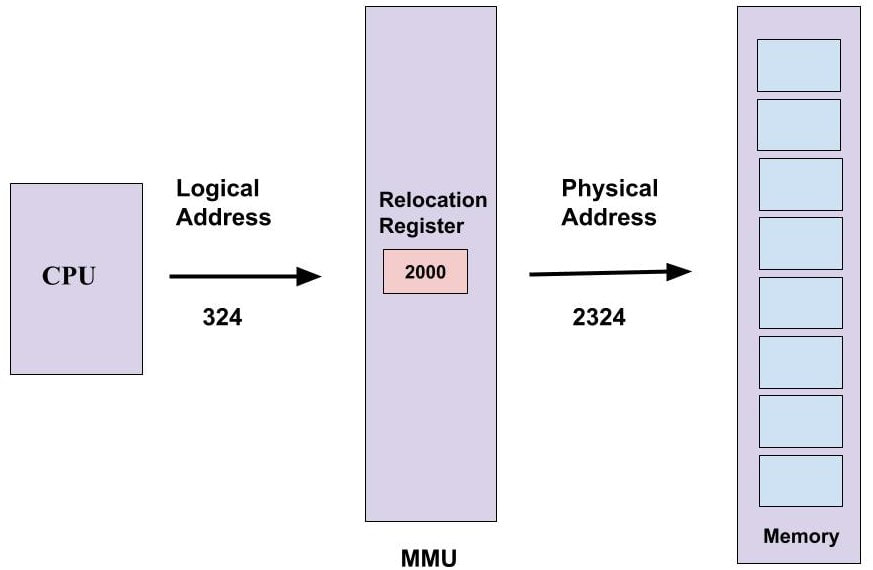
|
* Sometimes a complete program is loaded into the main memory (Static Loading), but sometimes only a certain part of the program is loaded into the memory when it is called - This mechanism enhances performance and it is called Dynamic Loading
* Also, there are times when one program is dependent on some other programs. Instead of loading all the dependent programs (Static Linking), the CPU links the dependent programs to the main memory only when it. is required - This is called Dynamic Linking
* Contiguous Memory Allocation is achieved by dividing the memory into fixed-sized partition. However, fixed-sized/static partition can cause internal fragmentation, limitation on the size of the process, external fragmentation and the degree of multiprogramming becomes less.
* In variable-size/dynamic partition, when a process arrives, a partition of size equal to the size of the process is created then allocated to the process. This results in no internal fragmentation but external fragmentation exists and it is difficult to implement.
--- Fragmentation ---
- When a processes is loaded and removed from memory and the remaining space is occupied by other processes, the next process will use the memory space that was just freed, but if the newly loaded process is smaller in size then it will not use the entire block of freed memory. A slice of memory space will remain unused. If this happens to each blocks in memory, then there will be many slices of unused memory. If the total free memory space is enough for the next process but it cannot be used since it is not contiguous => External Fragmentation
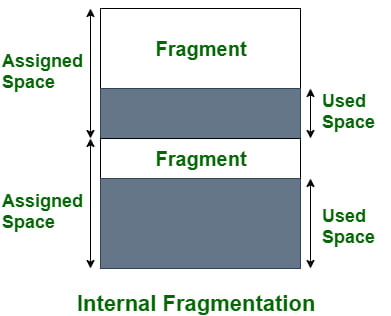
- Internal Fragmentation occurs when the allocated memory for a process is too big that there are remaining allocated memory unused
* Also, there are times when one program is dependent on some other programs. Instead of loading all the dependent programs (Static Linking), the CPU links the dependent programs to the main memory only when it. is required - This is called Dynamic Linking
* Contiguous Memory Allocation is achieved by dividing the memory into fixed-sized partition. However, fixed-sized/static partition can cause internal fragmentation, limitation on the size of the process, external fragmentation and the degree of multiprogramming becomes less.
* In variable-size/dynamic partition, when a process arrives, a partition of size equal to the size of the process is created then allocated to the process. This results in no internal fragmentation but external fragmentation exists and it is difficult to implement.
--- Fragmentation ---
- When a processes is loaded and removed from memory and the remaining space is occupied by other processes, the next process will use the memory space that was just freed, but if the newly loaded process is smaller in size then it will not use the entire block of freed memory. A slice of memory space will remain unused. If this happens to each blocks in memory, then there will be many slices of unused memory. If the total free memory space is enough for the next process but it cannot be used since it is not contiguous => External Fragmentation
- Internal Fragmentation occurs when the allocated memory for a process is too big that there are remaining allocated memory unused
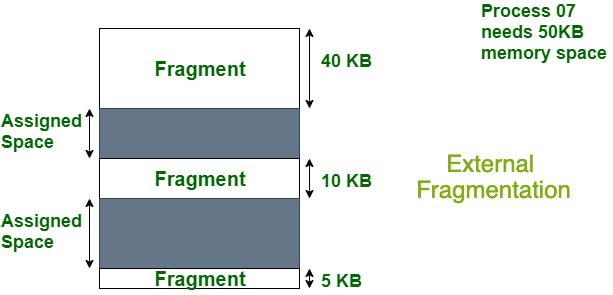
If we decide to merge the free blocks of memory to form a contiguous memory space (Compaction) => decreases efficiency and takes too much time to re-write data stored from one place to another
|
|
Info of each partitioned memory blocks are stored in a linked list - which indicates the size of the block and whether or not it is occupied
There are some partitioning algorithms to decide which block should be used for a given process:
- First Fit: traverse through until the first block that is big enough is found
- Best Fit: traverse through until the smallest block that is big enough is found
- Next Fit: traverse from current position until the next block that is big enough is found
- Worst Fit: traverse through until the biggest block is found
Paging
A process that's stored in the hard disk is broken into blocks of same size called pages (size of a page is a power of 2, between 512 and 8192 bytes). Similarly, the main memory is divided into equal size blocks called frames. The pages of the process that are constantly accessed and modified are kept in the main memory and the remaining of the pages for the process is kept in the disk. This way the main memory can hold pages for other processes at the same time. The pages stored in the hard disk act as extra main memory space => virtual memory
There are some partitioning algorithms to decide which block should be used for a given process:
- First Fit: traverse through until the first block that is big enough is found
- Best Fit: traverse through until the smallest block that is big enough is found
- Next Fit: traverse from current position until the next block that is big enough is found
- Worst Fit: traverse through until the biggest block is found
Paging
A process that's stored in the hard disk is broken into blocks of same size called pages (size of a page is a power of 2, between 512 and 8192 bytes). Similarly, the main memory is divided into equal size blocks called frames. The pages of the process that are constantly accessed and modified are kept in the main memory and the remaining of the pages for the process is kept in the disk. This way the main memory can hold pages for other processes at the same time. The pages stored in the hard disk act as extra main memory space => virtual memory
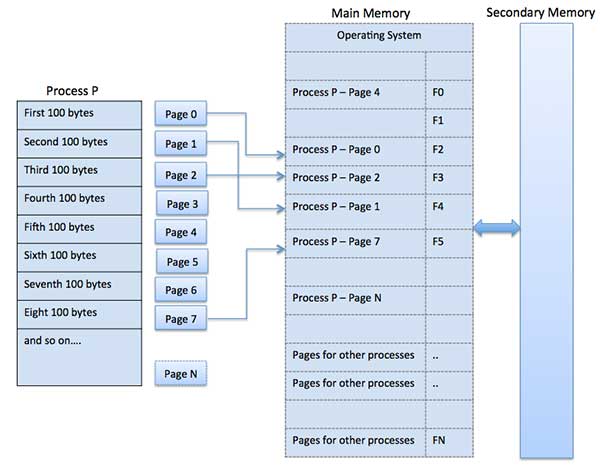
Page Table - A page table contains which frame number contains which page (Each process has its own page table)
Inverted Page Table - For OS to track all page-frame mappings of all processes in one table
PTBR (Page Table Base Register) - used to hold the base address of the page table for the current process
Logical Address = Page # + Page Offset (indicates the specific word that needs to be read from that page)
Physical Address = Frame # + Page Offset
Inverted Page Table - For OS to track all page-frame mappings of all processes in one table
PTBR (Page Table Base Register) - used to hold the base address of the page table for the current process
Logical Address = Page # + Page Offset (indicates the specific word that needs to be read from that page)
Physical Address = Frame # + Page Offset
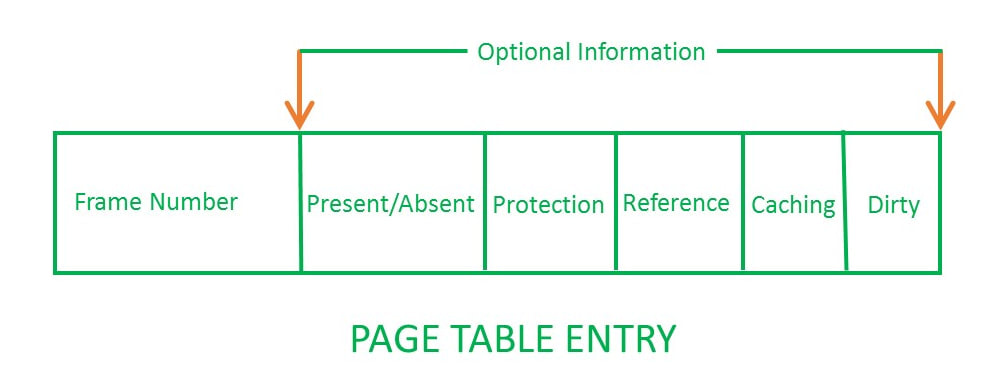
Translation Look aside Buffer: a memory cache in the CPU that only contains the entries of the main pages frequently accessed instead of fetching from page table in main memory every time
* Sometimes a page table might be too long so there are multiple page table levels, one entry of the outer page table will point to another inner page table => Hierarchical Paging
* To handle address space that are larger than 32 bits, a hashed page table is used - keys are virtual pg# and value is mapped frame
* Clustered Page tables are like hashed page table but each entry refers to several pages
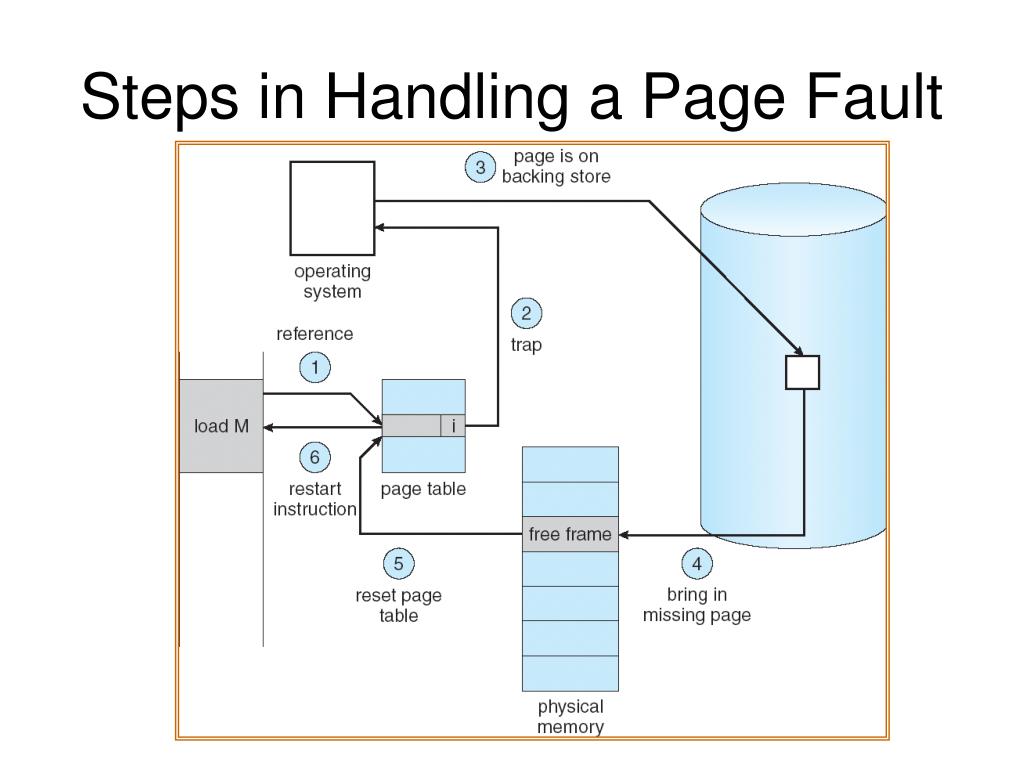
Demand Paging: Pages of a process which are least used, gets stored in the secondary memory. It gets copied to main memory when it's accessed => Page Fault occurs - requested page not in RAM
* If Page fault occurs too frequently and the OS spends more time swapping than CPU utilization for the process => Thrashing - usually occurs when there's too many processes in the main memory executing simultaneously. This can be avoided by clumping and loading all pages for the process onto RAM or focus on reducing page fault frequency
* Sometimes a page table might be too long so there are multiple page table levels, one entry of the outer page table will point to another inner page table => Hierarchical Paging
* To handle address space that are larger than 32 bits, a hashed page table is used - keys are virtual pg# and value is mapped frame
* Clustered Page tables are like hashed page table but each entry refers to several pages
Demand Paging: Pages of a process which are least used, gets stored in the secondary memory. It gets copied to main memory when it's accessed => Page Fault occurs - requested page not in RAM
* If Page fault occurs too frequently and the OS spends more time swapping than CPU utilization for the process => Thrashing - usually occurs when there's too many processes in the main memory executing simultaneously. This can be avoided by clumping and loading all pages for the process onto RAM or focus on reducing page fault frequency
Swapping
Swapping is the process when all the frames in main memory are full and a page needs to be removed to access a new page.
A page replacement algorithm can be used:
- FIFO (First-In-First-Out): First inserted page into RAM will be the first to remove
- LRU (Least Recently Used): Least Recently accessed page will be the first page to be removed from RAM
Segmentation
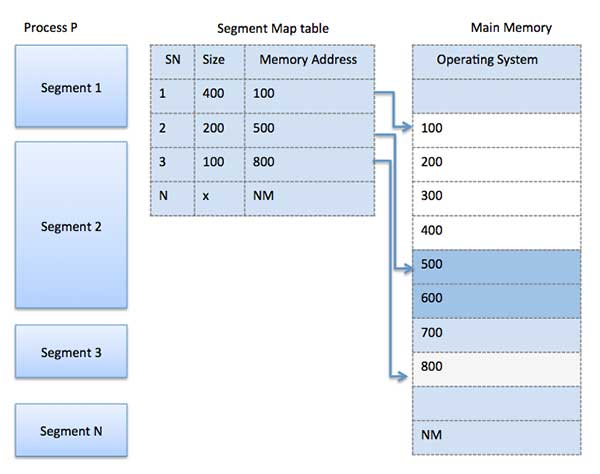
Like paging, a process is divided into segments of different size and each segment will be placed into frames with fitting size.
Swapping is the process when all the frames in main memory are full and a page needs to be removed to access a new page.
A page replacement algorithm can be used:
- FIFO (First-In-First-Out): First inserted page into RAM will be the first to remove
- LRU (Least Recently Used): Least Recently accessed page will be the first page to be removed from RAM
Segmentation
Like paging, a process is divided into segments of different size and each segment will be placed into frames with fitting size.
File Systems
A file is a type of data structure that stores sequence of records. Files can be simple (plain text) or complex (specially-formatted). A collection of data is stored in a file, collection of files is known as a Directory, and a collection of directory is called a File System. File management takes care of File Structure, Recovering Free Space, Disk Space Assignment to the files, and Tracking Data Location.
* Attributes of a File
* A shared file or directory will allow multiple users to access/edit the same file. These multiple paths to the shared location can be either a symbolic (logical/soft) link or hard (physical) link. When a shared file gets deleted,
*A file system is divided into different layers
* MBR (Master Boot Record)
* Data Structures on the Disk
* Directory Implementation
* Allocation Methods - used to allocate disk space to the files
* Everything in Linux/Unix is a file => Everything in Linux/Unix is actually an inode
* Attributes of a File
- Name, Identifier (Unique tag(number) within the file system), Type, Location, Size, Protection, Time & Date
- Create, Open, Write, Read, Re-position/Seek, Delete, Close, Rename
- Sequential Access - OS reads the file word (few bytes) by word (ie: audio and video files)
- Direct Access - Generally implemented in a database system, it will only access the given block/record#
- Indexed Access - Built on top of sequential, but uses an index to control the pointer while accessing the files
* A shared file or directory will allow multiple users to access/edit the same file. These multiple paths to the shared location can be either a symbolic (logical/soft) link or hard (physical) link. When a shared file gets deleted,
- If it's a soft link, the file will be deleted locally and we are left with a dangling pointer
- If it's a hard link, the actual file will get deleted after deleting all reference to that file
*A file system is divided into different layers
- Application Programs => Logical File System => File Organization Module => Basic File System => I/O Control => Device
- When the application program asks for a file, it is directed to the logical file system. The logical file system contains the meta data of the file and directory structure. Files are divided into various logical blocks which are stored in the hard disk. The hard disk is divided into various tracks and sectors (each track/sector blocks contain its own specific type of process). In order to store and retrieve files, the logical blocks need to be mapped to physical blocks. This mapping is done by file organization module and it also manages free space. Once the file organization module decides which physical block the application program needs, it passes the info onto the basic file system. The basic file system issues commands to the I/O control to fetch those blocks (because the hard disk is a type of I/O). The I/O controls contains the codes to access the hard disk. These codes are known as device drivers and they also handle interrupts.
* MBR (Master Boot Record)
- It is the info present in the first sector of any hard disk - It contains where the OS is located in the hard disk and how it can be booted in the RAM
- It also includes a partition table which locates every partition in the hard disk
- When you turn on the computer...
* Data Structures on the Disk
- Boot Control Block, Volume Control Block, Directory Structure, File Control Block (info on FCB can be found by: ls -lrt)
* Directory Implementation
- Linear List: All files in the directory point to data blocks and the next file in the directory
- Hash Table: The keys are the file names and the values are pointers to the data blocks
* Allocation Methods - used to allocate disk space to the files
- Contiguous Allocation
- Linked Allocation - each disk block is linked to the next
- File Allocation Table - A table contains info on all the disk block links
- Indexed Allocation - stores all disk pointers in one of the blocks (indexed block) since table takes too much space
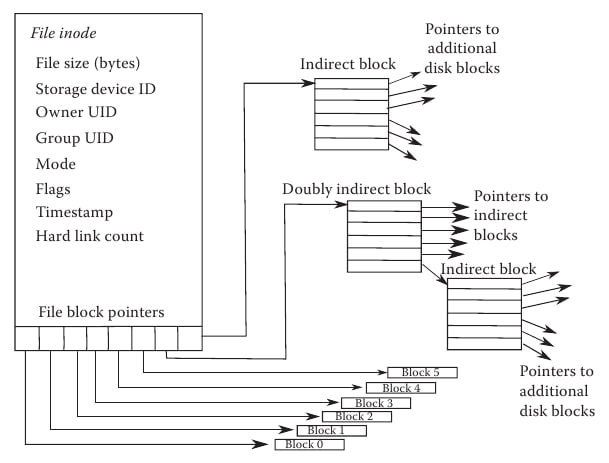
- Inode - An inode is a type of data structure that contains information on the attributes of the file and the disk block location of where the data of the file is stored in the disk. It may also contain pointers to other inodes.
* Everything in Linux/Unix is a file => Everything in Linux/Unix is actually an inode
* Free Space Management
- Bit vector: stores 1 if the space bit is free or else 0
- Linked List: Contains a list of pointers to free blocks on disk
* Disk Scheduling Algorithms - To select a disk request from the queue of IO requests and decide which request will be processed first
- Bit vector: stores 1 if the space bit is free or else 0
- Linked List: Contains a list of pointers to free blocks on disk
* Disk Scheduling Algorithms - To select a disk request from the queue of IO requests and decide which request will be processed first
- FCFS (First Come First Serve)
- SSTF (Shortest Seek Time First) - The disk arm performs the next request with the least arm movement
- SCAN - The disk arm moves into a particular direction till the end (to read data) and then moves the opposite direction
- Look - The disk arm moves into 1 direction but not till the end (but either to the smallest or biggest block) then the opposite direction